 English
 Язык
Язык Українська
Your shopping cart is empty!
You may also like

2.x, 3.x

2.x, 3.x

Adding attributes in one click in OpenCart
 Get bonus +100 грн. for your review
| Characteristics | |
| OpenCart | 2.0, 2.1, 2.2, 2.3, 3.0 |
| XML modification | Yes |
| Localization | English, Ukrainian, Russian |
| Statistics | 38088 10119 |
| Added | 07.10.2017 |
| Updated | 01.09.2025 · 10 months ago |
| Files | product-attr-manager_oc3x.ocmod.zip |
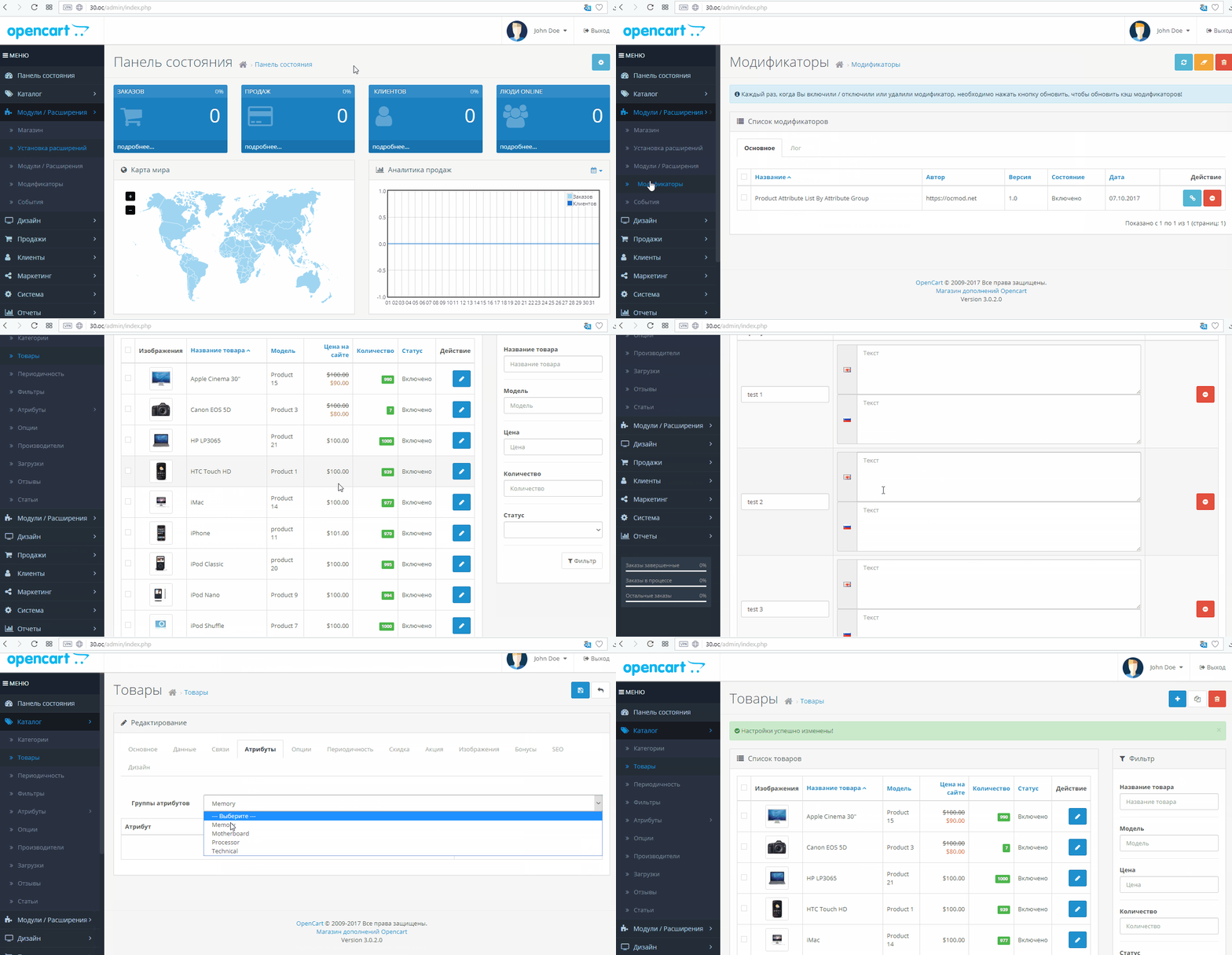
When filling out a product card, you often have to add features one at a time: select an attribute, move to the next one, and then search for the desired name again. After installation, a group of attributes appears in the admin panel, and the entire set is immediately added to the features table.
Filling out characteristics using a ready-made template
The module adds a separate drop-down list with attribute groups to the product card. The content manager selects, for example, "Screen," "Memory," or "Dimensions," and all attributes from that group appear on the card immediately.
- no need to remember the exact names of attributes;
- fewer gaps in cards for similar products;
- fields for different languages are created at once;
- extra lines can be deleted using a regular button in the table;
- The order of attributes is taken from the directory settings.
How the work in the product card is changing
- The group selection is located directly on the attributes tab, next to the familiar table.
- After selecting a group, rows are added without reloading the page.
- For each attribute, a description field immediately appears in all store languages.
- The manager fills in only the values: diagonal, material, volume, weight or other characteristics.
- Repeated addition can be used for different groups if a product requires multiple sets of characteristics.
- An unnecessary attribute can be removed from the card with one button, just like in the standard admin panel.
- Attribute names are pulled from the reference book, so there are fewer accidental duplicates and typos.
Before filling out cards en masse, it's recommended to tidy up attribute groups: remove unnecessary items and set up sorting according to how the characteristics should appear on the display.
The scenario is simple: a new smartphone model is added, the manager opens the attributes tab, selects the "Smartphone Specifications" group, and receives a pre-defined list of fields. All that remains is to enter the values for each language and delete lines that don't apply to a specific product.
| File Name | Added | Modified |
|---|---|---|
| 04.12.2017 | 01.09.2025 | |
| 04.12.2017 | 01.08.2023 | |
| 07.10.2017 | 17.02.2025 |
AI Assistant
Recently viewed
2.x, 3.x


OCMOD.NET is a platform with the best collections of modules and templates to expand the functionality of your online store on Opencart and OcStore.
Write to technical support

- OCMOD.NET © Copyright 2017-2026


Leave your review about this product