 English
 Язык
Язык Українська
Your shopping cart is empty!
You may also like

2.x, 3.x

2.x, 3.x

Admin Product Filter OpenCart
 Bonus +49 грн. to your account
| Characteristics | |
| OpenCart | 3.0 |
| XML modification | Yes |
| Localization | English, Russian |
| Statistics | 11934 116 |
| Added | 08.07.2020 |
| Updated | 12.09.2025 · 11 months ago |
| Files | admin-product-filter_oc3x.ocmod.zip |
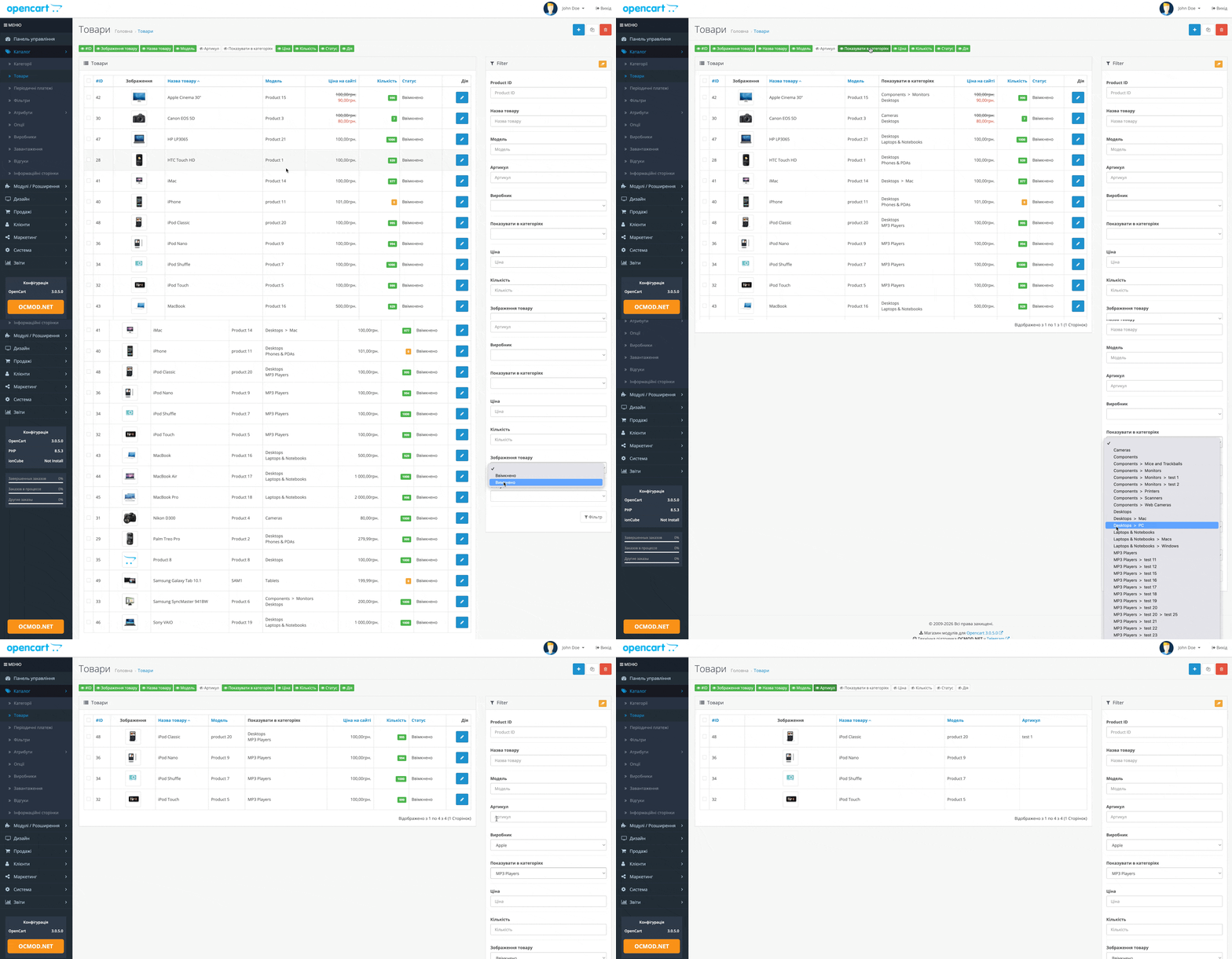
The Additional Product List Columns module makes the product list in the OpenCart admin panel significantly more user-friendly: it adds new filter fields, auto-suggestions, and quick column visibility toggles. This makes it easier to find the items you need, and the table displays only what's most important right now.
Why do you need a module?
When you have a large number of products, the standard "name/model" filters are often insufficient. This module expands your search and sorting capabilities, allowing you to navigate the catalog more precisely and without unnecessary clicks.
Main functions
- Filter by Product ID (with auto-completion).
- Filter by SKU (with auto-completion).
- Filter by manufacturer (including the option - Unknown - ).
- Filter by category (select from list).
- Filter by image: show products with or without photos.
- Sorting by Product ID and SKU, plus displaying additional columns in the table.
- Clear filters button - resets entered values in one click.
Column management (show/hide)
Toggle buttons appear above the product list, allowing you to hide or show the following columns: ID, Image, Name, Model, SKU, Category, Price, Quantity, Status, and Action. The settings are saved.
Important: The module saves the selected column visibility in the settings, so the next time you access the product list, you'll see the familiar table view.
What data and operations are affected
- Requests for products are supplemented with conditions for ID, SKU, manufacturer, category, and the presence of an image.
- Lists of manufacturers and categories are pulled up for the filter drop-down lists.
- Added AJAX operation ShowHide for instant hiding/showing columns without reloading.
Practical examples
- The supplier sent a list of SKUs - insert the SKU into the filter and quickly find the product.
- You need to tidy up your catalog - turn on the "no image" filter and upload a photo.
- If you're working with a single category, filter by category and hide unnecessary columns to avoid distractions.
| File Name | Added | Modified |
|---|---|---|
admin-product-filter_oc3x.ocmod.zip Size: 5.04 KB | 08.07.2020 | 12.09.2025 |
AI Assistant
Recently viewed

Featured




OCMOD.NET is a platform with the best collections of modules and templates to expand the functionality of your online store on Opencart and OcStore.
Write to technical support

- OCMOD.NET © Copyright 2017-2026


Leave your review about this product