 English
 Язык
Язык Українська
Your shopping cart is empty!
You may also like

2.x, 3.x

2.x, 3.x

IMDiscount - Discount Strategy for OpenCart
 Bonus +49 грн. to your account
| Characteristics | |
| OpenCart | 3.0 |
| XML modification | Yes |
| Localization | English, Ukrainian, Russian |
| Statistics | 3311 48 |
| Added | 28.02.2025 |
| Updated | 28.02.2025 · 1 years ago |
| Files | im-discount_oc3x.ocmod.zip |
The IMDiscount (OC 3) Discount Strategy module is a powerful tool for organizing a flexible discount system in OpenCart. It allows you to create cumulative discounts and discounts for the current order, and also supports mass generation of standard discounts and promotions. This module is suitable for online stores that want to stimulate repeat purchases and flexibly manage prices.
Main features
- Cumulative discounts and discounts on the current order
- Flexible modules for displaying information about discounts
- Mass generation of discounts and promotions OpenCart
- Setting up conditions for quantity and amount of goods
- Three accumulation modes (larger, smaller discount and amount)
- Possibility to use percentages and fixed amounts simultaneously
- Filters by clients, periods, order statuses and products
- Various options for calculating amounts and quantities of goods
- Filtering by user groups
- Three options for calculating percentages: by accounting modules, by products without discounts, by all products
- Flexible settings for applying discounts and rounding them
- Supports multitasking using AJAX
- Fully compatible with OpenCart without rewriting the core
The order of creating strategies
In general, the order of creating strategies is similar to the usual OpenCart view, but taking into account that in the module almost everything is done using ajax (without the need to reload the page).
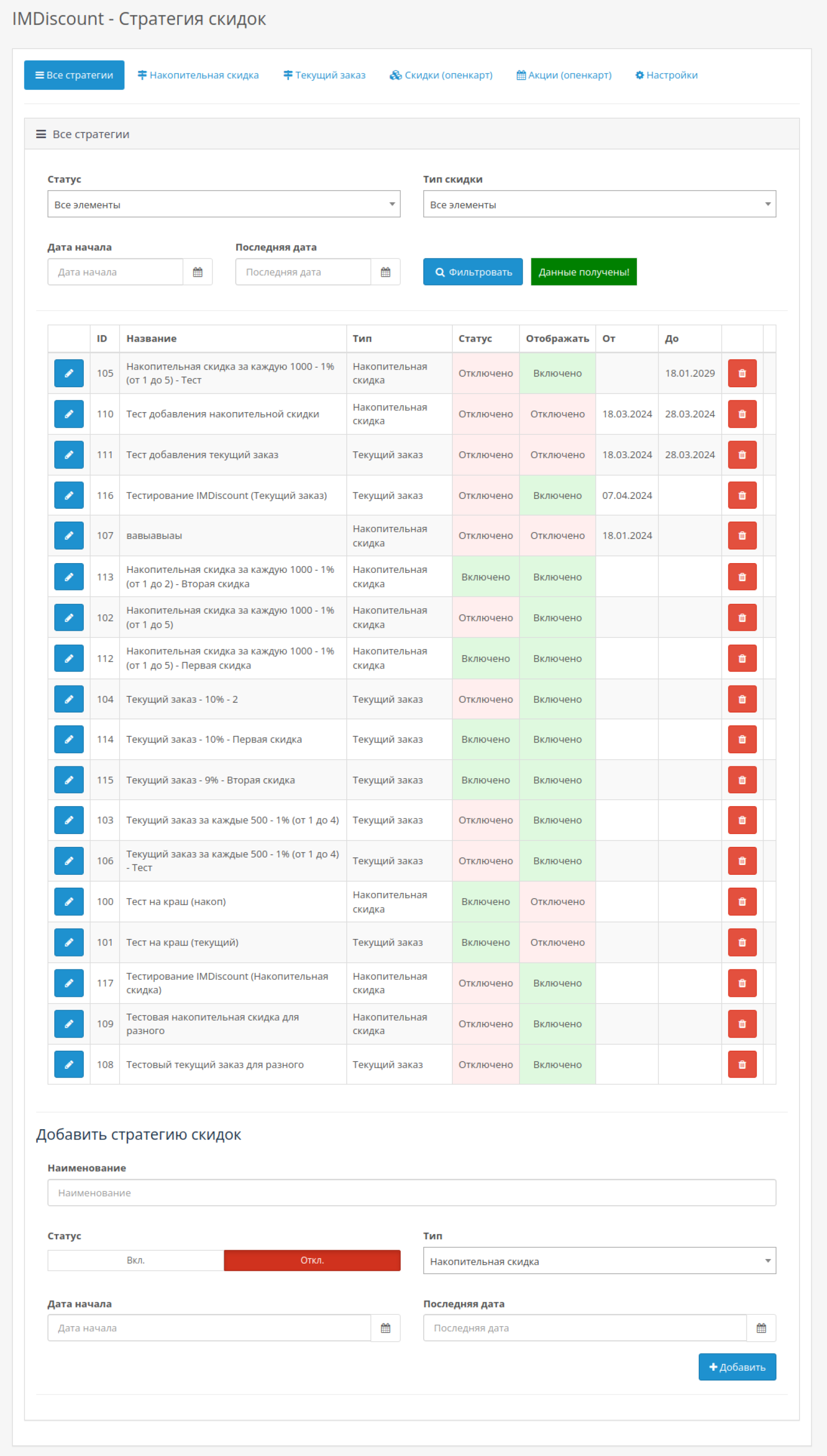
- Open the “All strategies” tab and create a strategy of the required type and name (with other fields).
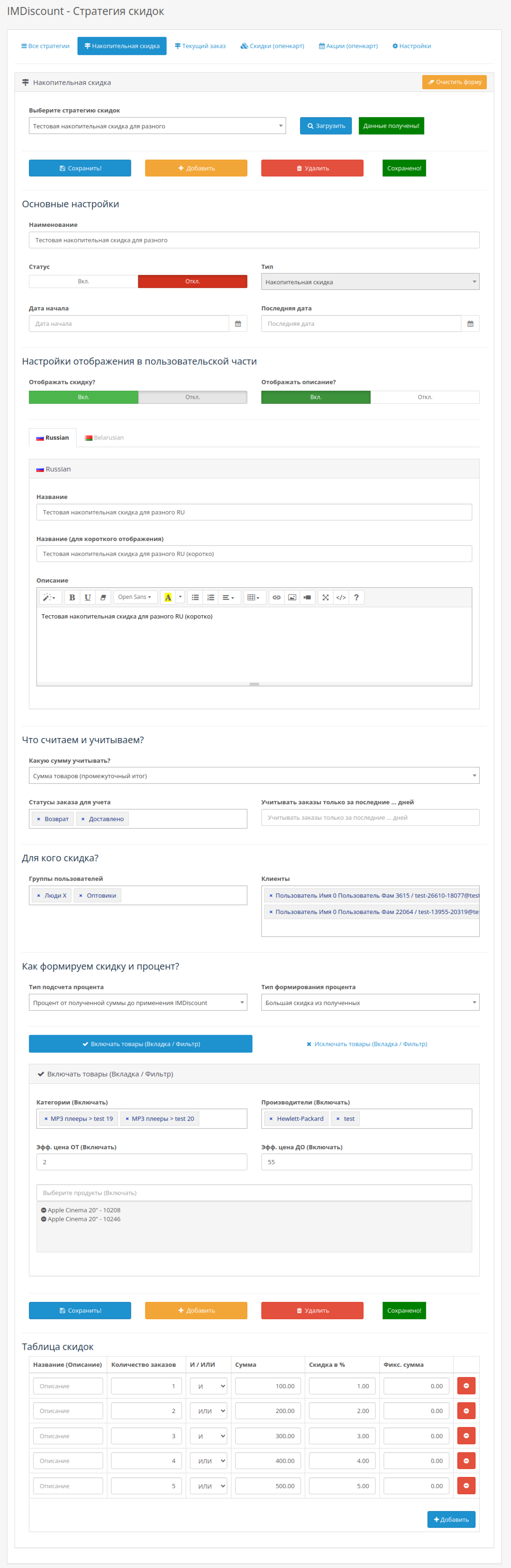
- Find the strategy you need in the list and click the button on the left (edit). Or open the tab with the corresponding strategy type, find the one you need in the top drop-down list, and then click the "Download" button next to it.
- Fill in additional calculation and accounting parameters, as well as the discount table, and click the "Save" button.
IMPORTANT! - All adjustments are applied immediately!
Since version 1.4.0, you can create strategies or their copies in the corresponding tabs, without necessarily creating them through the "All strategies" tab. To do this, you need to click the "Add" button instead of "Save".
How is the calculation done?
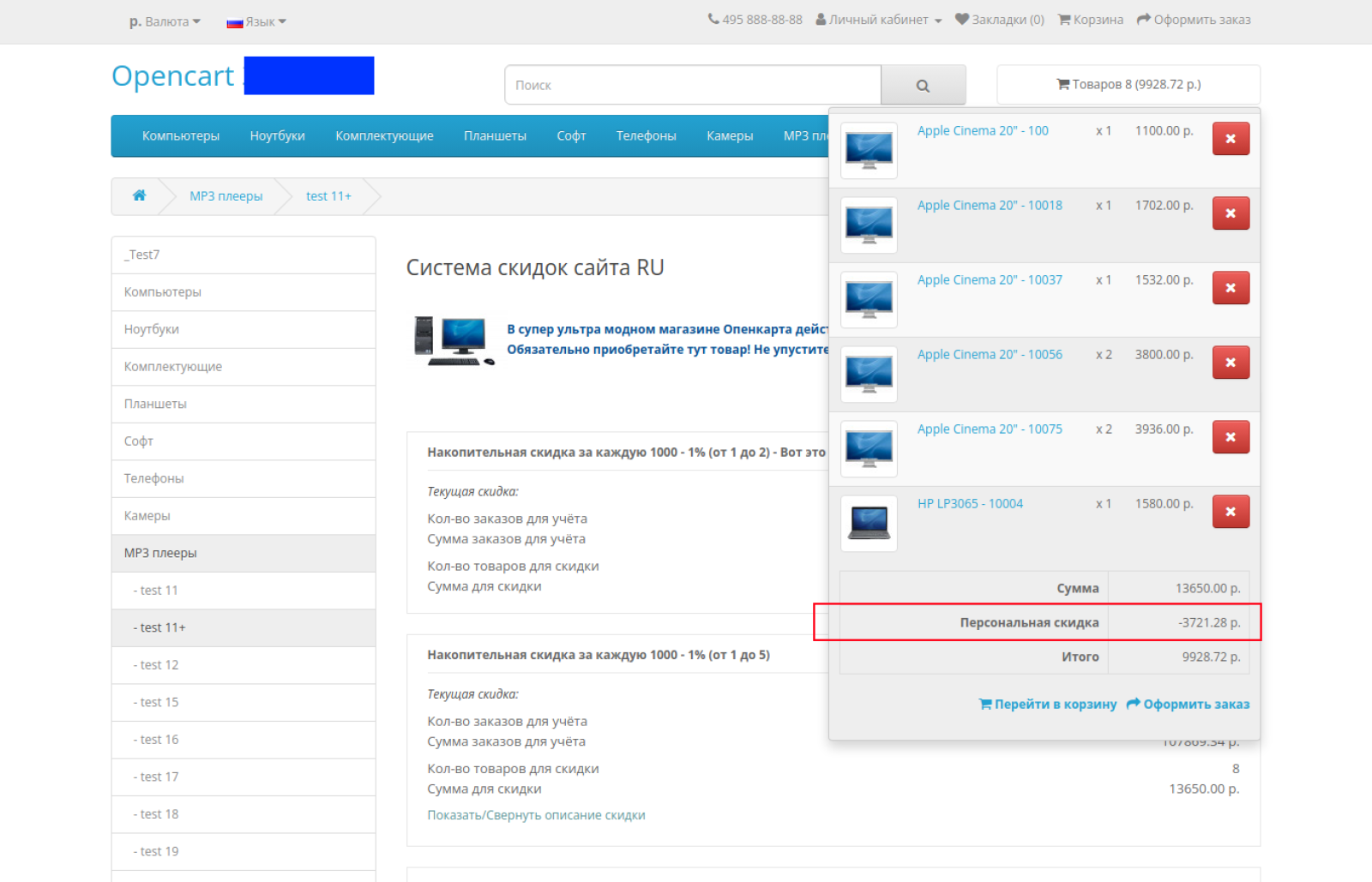
The calculation is carried out in two stages, which allows you to build very flexible discount strategies (an example of the calculation is below).
First stage
First, all active discount strategies are loaded (criteria - enabled and suitable by date, as well as specific parameters during calculations). The discount table for each strategy is looked at. And for each line, the percentage and fixed amount are calculated. Of these two numbers, the maximum is selected.Then, within each strategy, it is determined how to select the "Type of percentage formation" (a larger value, a smaller value, or the total of all values in the discount table from the first stage). Accordingly, from the previously calculated discounts in the table, the resulting discount of the strategy is formed (in accordance with the selected setting).
Second stage
When all discounts for current strategies are received, the global parameter in the settings is looked at - "Accumulation type (Global)". And, accordingly, the final discount is calculated (larger, smaller or the sum of discounts).IMPORTANT! The discount cannot be greater than the value BEFORE the IMDiscount module was applied. This is done to avoid orders with negative value.
Calculation example
Let's say you need to take into account two types of discounts. The first is the discounts that are formed based on accumulated orders and are applied to the total amount of all goods in the order (1% for every 1,000 rubles, up to 10%). The second is an additional discount within the current order only for goods without promotions and discounts (also 1% for every 1,000, up to 10%). In this case, the discounts need to be summed up.
Accordingly, the following settings are set in the module. Accumulation type (Global) - summation. So that the discounts of the strategies are summed up. Two strategies are created and filled in - one in "Cumulative discount", the second in "Current order". For each strategy, a discount table is also filled in indicating the percentage and fixed amount (in the example, the latter is 0, since the task does not require it).
The buyer makes an order for 3456 rubles, of which 1000 rubles are discounted goods. The buyer has already made several orders for a total of 7000 rubles.
The following calculation occurs:
Step 1: Since only percentages are applied, a percentage will always be selected for each row of the discount strategy table.
Based on the data, all items from 1% to 7% are suitable in the first strategy table. The maximum is selected, i.e. 7%. In the second discount strategy, only regular goods are taken into account (RUB 2,456), i.e. only discounts from the 1% and 2% table are suitable. Accordingly, the maximum of 2% is selected.
Second stage. Look at the global parameter, and there is summation. It turns out 7% of 3456 + 2% of 2456 = 241.92 + 49.12 = 291.04.
As you can see, a complex calculation scheme is easily implemented by the module.
How is the percentage formed?
There are three types of amounts in general (for N-items see below):
- An intermediate amount taking into account the order of application of the module. Thus, if the percentage should include delivery, bonuses, etc., then it is worth using this type of discount and specifying the desired order of the module (after delivery, bonuses, etc.).
- Percentage of the total amount of goods without discounts. If you have special offers (standard discounts) or current promotions for the goods, then this option allows you not to take such goods into account when calculating the discount.
- Percentage of the total amount of all products. If you only need to consider all products, without shipping methods and other things.
Accordingly, depending on the selected option, the percentage is calculated.
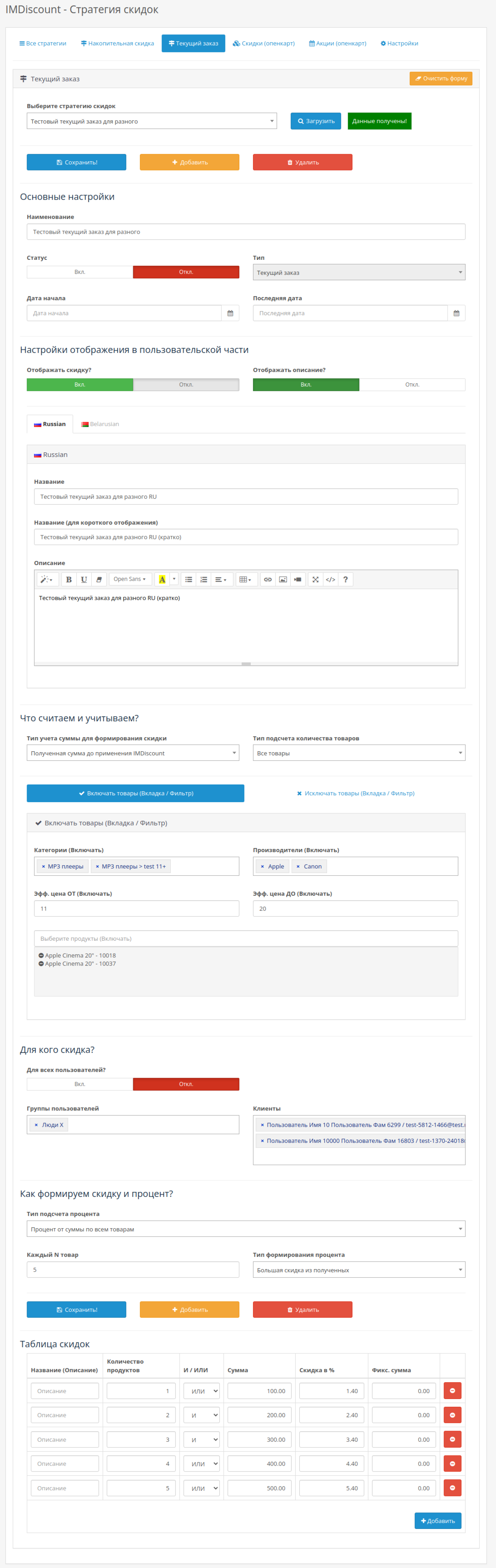
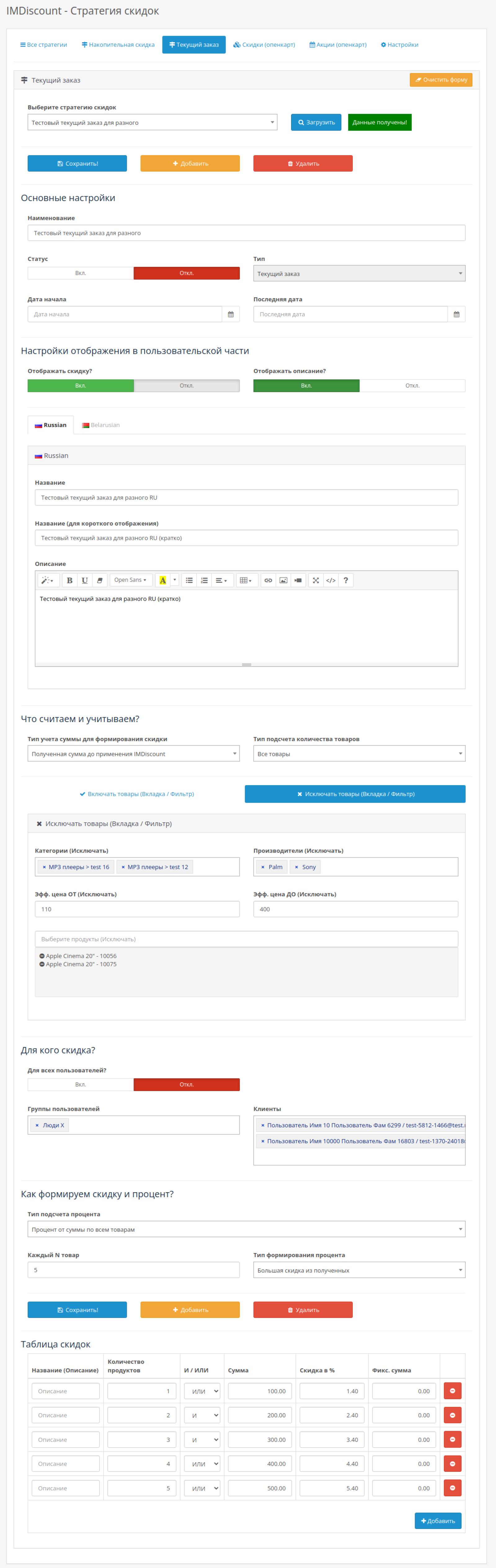
Current order - percentage calculation - Each N-item (discount from the most expensive or from the cheapest)
If you need to organize discounts for each N-item in sorting from the most expensive to the cheapest or vice versa from the cheapest, then this can be done.
For example, for every second pair of gloves, provide a 50% discount in order from expensive to cheap. In this case, if the customer added 20 simple gloves and 8 gloves with some expensive pattern to the cart (i.e. discount for 14 items = 28 / 2), then the discount will be calculated as follows: 0.5 * cost of 8 expensive gloves with a pattern + 0.5 * cost of 6 simple gloves (since there are only 8 gloves with a pattern).
Within the framework of this calculation, the type of calculation of the quantity of goods is also taken into account, so that it is possible to exclude goods that already have discounts (from quantity; promotions). Plus, the entire calculation algorithm according to the discount table and other mechanisms is preserved.
Filtering products (inclusion, exclusion) in the discount strategy Current order
How filtering works. Inclusion filters are checked first, then exclusion filters. Exclusion filters have priority.
That is, if a product matches the inclusion filters and exclusion filters, then such a product is not taken into account, since it is also in the exclusion group. Let's say product X is in two categories A and B. Category A is indicated in the inclusions, and category B in the exclusions. The product matches the inclusion filters, since it is in category A, but is excluded, since category B is indicated in the exclusion filters.Filtering of inclusion is carried out according to the following rule (the same approach is used for exclusion). The product is suitable in the following cases:
- If the product is in the specified categories AND the specified manufacturers AND in the price range
- OR - If the product is listed separately
If settings are not specified for any of the items (for example, products are not specified), then only one item (in which settings are specified) becomes the selection criterion. If no settings are specified at all, then filtering is not performed - in other words, it is considered that all products are suitable (in case of exclusion with an empty filter, filtering is not applied).
For prices. If the value of the cost filter is equal to or less than zero, then it is considered that there are no restrictions for this price filter. For example, the cost FROM equal to 10 and the cost TO equal to 0 means that the cost of the product must be greater than or equal to 10. Note that prices are set in the base currency.
Effective price means that the price displayed in the shopping cart is used for checking. For example, if an item with a price of 100 after standard discounts and applying options costs 120, then the value 120 will be used for filtering.
It is worth noting that filtering is applied to all product-specific settings. This means that when calculating amounts and quantities (both for the row table estimate and for forming the percentage), the only thing that is not recalculated is the "Received amount before applying IMDiscount" option.
For example, there were two items in the basket: A for 500 and B for 200. After the filter, only item B for 200 remained. The settings indicate that the percentage applies to all items. This means that when calculating the amounts from the discount table, only item B will be taken into account. For example, if 10% is set in the discount table, then it will not be (500 + 200) * 0.1 = 70, but (200 * 0.1) = 20.
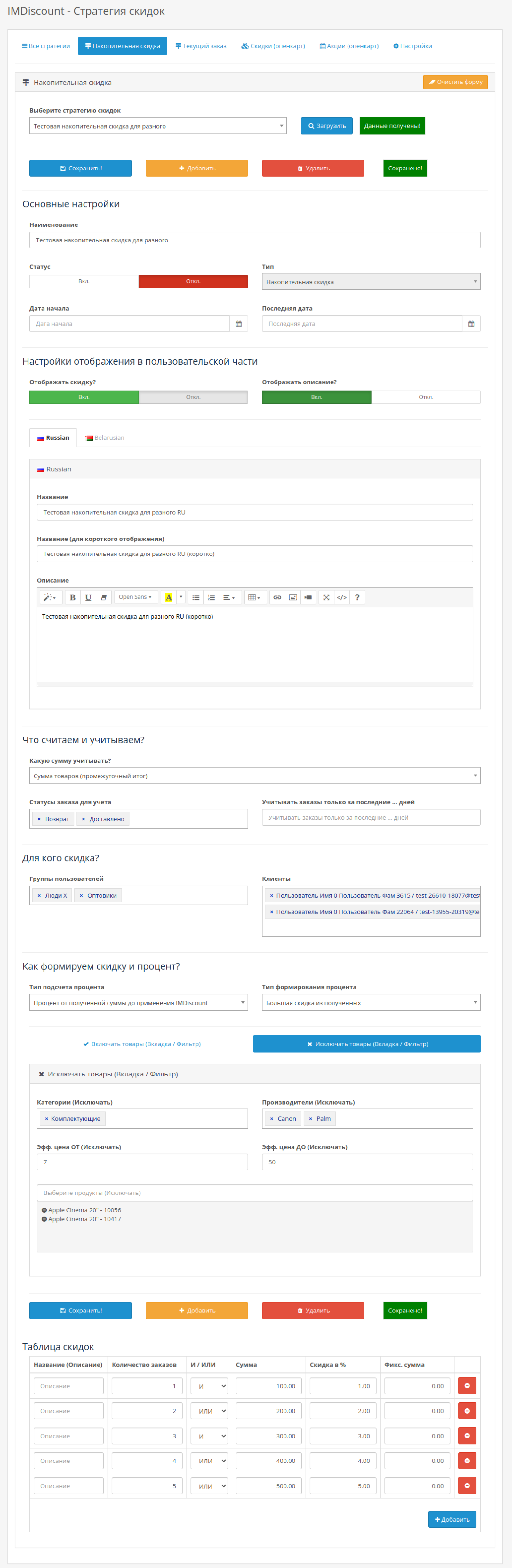
Product filters (inclusion, exclusion) in the Cumulative discount strategy
IMPORTANT! Filters are not applied to orders, where the total amount is calculated, but to specific products that are located in the basket
For example, if you excluded a product in the filters, then when calculating the amounts of already completed orders, this product will not be subtracted from the total amount of orders. But the discount percentage will not be applied to this product (if the discount is applied to products, and not to the amount before the module).For example, product X is excluded and the discount is applied to products. When calculating completed orders, no filtering will be performed. But in the basket, product X will be filtered (the discount will not be applied to it).
Otherwise, the logic is similar to how the calculation occurs in the Current Order strategy.
How filtering works. Inclusion filters are checked first, then exclusion filters. Exclusion filters have priority.
That is, if a product matches the inclusion filters and exclusion filters, then such a product is not taken into account, since it is also in the exclusion group. Let's say product X is in two categories A and B. Category A is indicated in the inclusions, and category B in the exclusions. The product matches the inclusion filters, since it is in category A, but is excluded, since category B is indicated in the exclusion filters.Filtering of inclusion is carried out according to the following rule (the same approach is used for exclusion). The product is suitable in the following cases:
- If the product is in the specified categories AND the specified manufacturers AND in the price range
- OR - If the product is listed separately
If settings are not specified for any of the items (for example, products are not specified), then only one item (in which settings are specified) becomes the selection criterion. If no settings are specified at all, then filtering is not performed - in other words, it is considered that all products are suitable (in case of exclusion with an empty filter, filtering is not applied).
For prices. If the value of the cost filter is equal to or less than zero, then it is considered that there are no restrictions for this price filter. For example, the cost FROM equal to 10 and the cost TO equal to 0 means that the cost of the product must be greater than or equal to 10. Note that prices are set in the base currency.
Effective price means that the price displayed in the shopping cart is used for checking. For example, if an item with a price of 100 after standard discounts and applying options costs 120, then the value 120 will be used for filtering.
It is worth noting that filtering is applied to all product-specific settings. This means that when calculating amounts and quantities (both for the row table estimate and for forming the percentage), the only thing that is not recalculated is the "Received amount before applying IMDiscount" option.
For example, there were two items in the basket: A for 500 and B for 200. After the filter, only item B for 200 remained. The settings indicate that the percentage applies to all items. This means that when calculating the amounts from the discount table, only item B will be taken into account. For example, if 10% is set in the discount table, then it will not be (500 + 200) * 0.1 = 70, but (200 * 0.1) = 20.
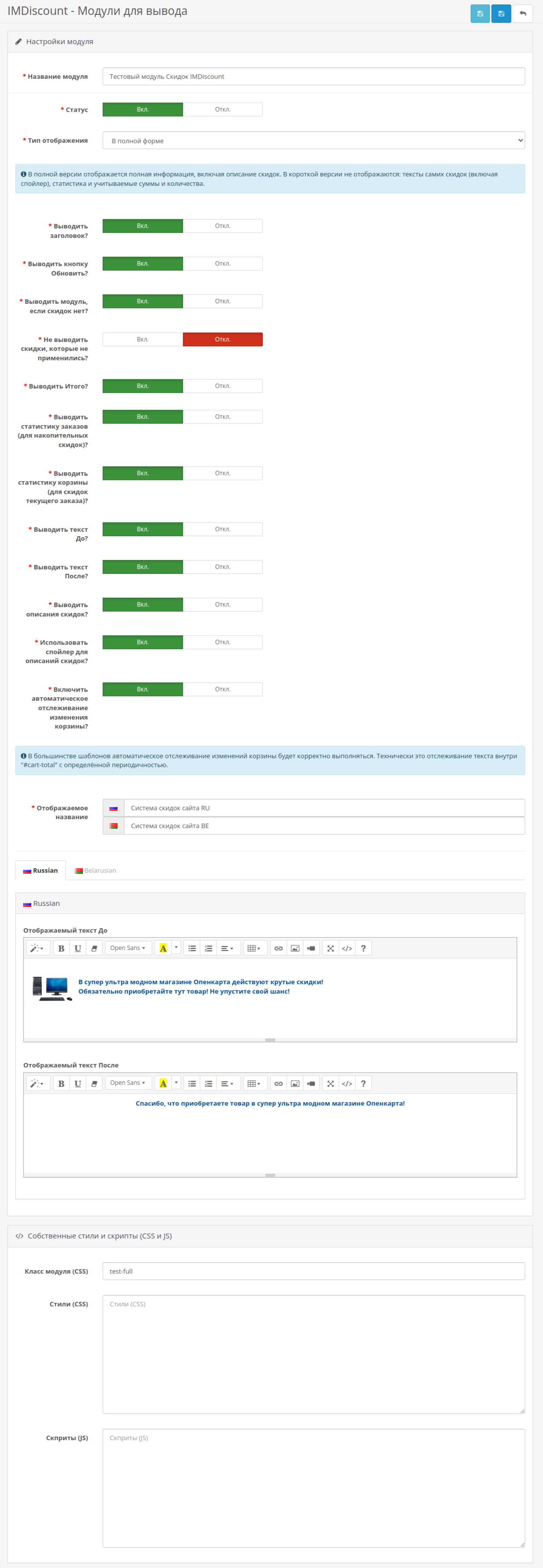
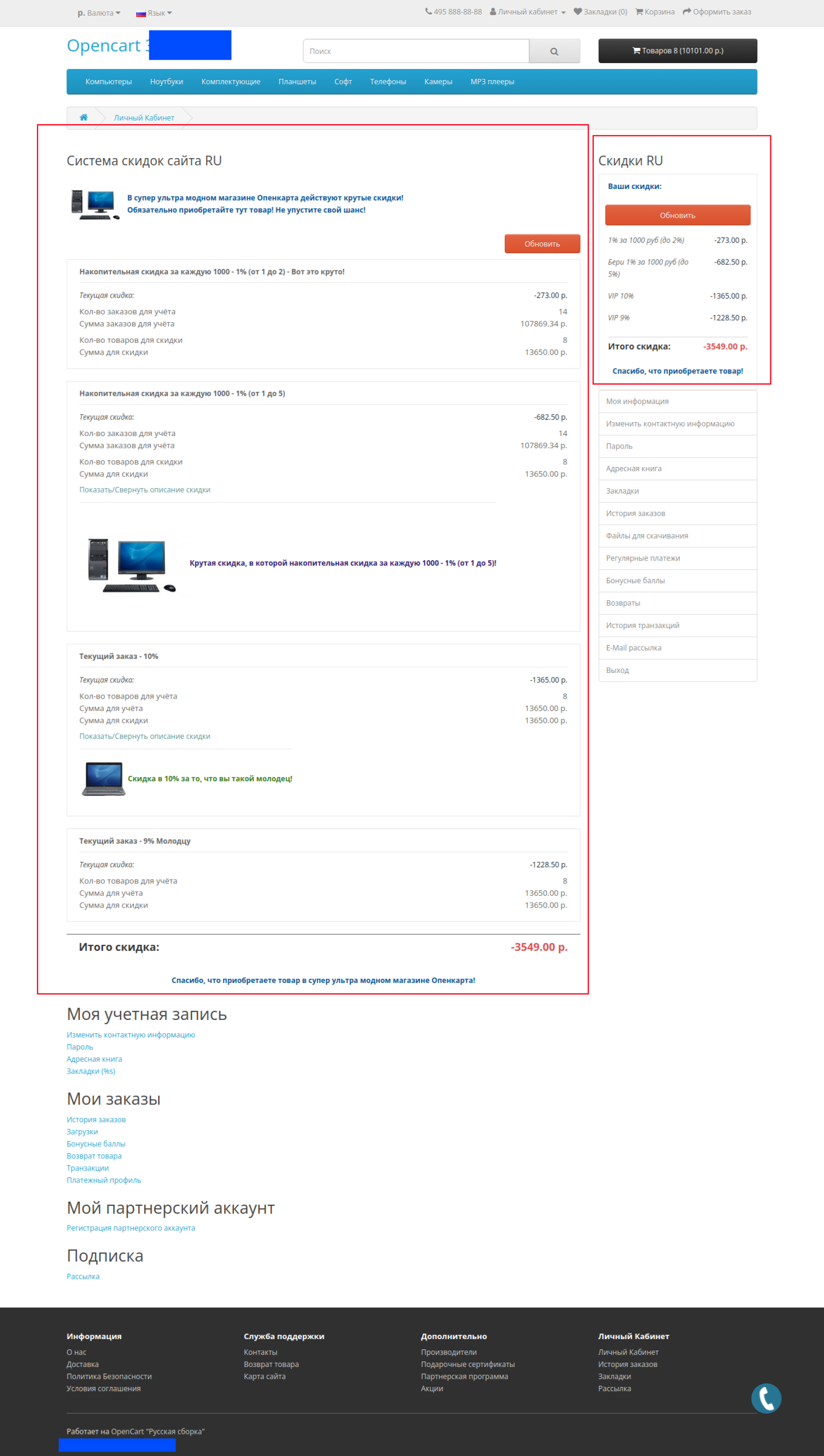
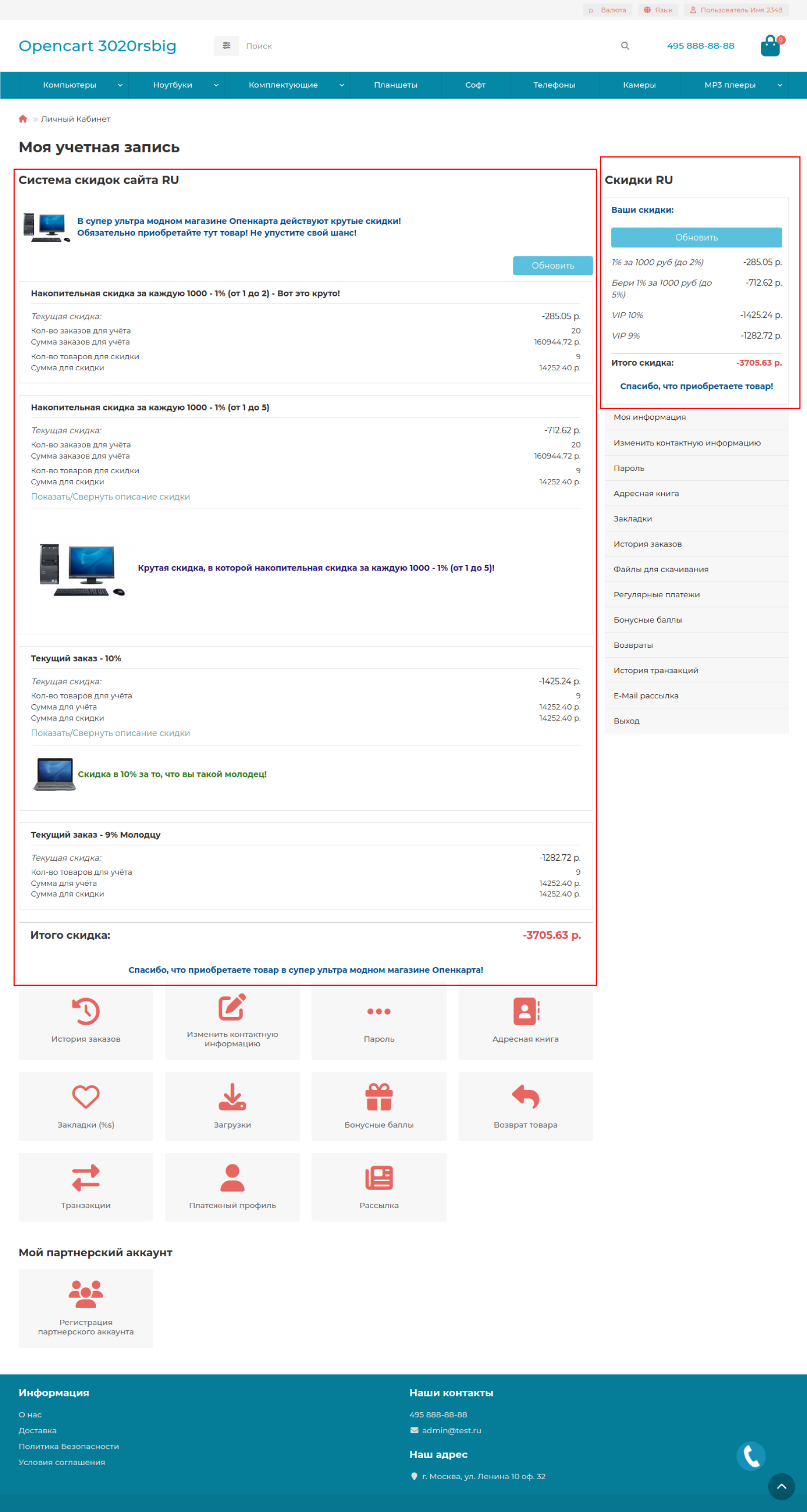
Modules for displaying discounts (strategies)
The module can be displayed in two versions:
- Full - all parameters are displayed
- Short - in this case, discount details, as well as the amounts and quantities taken into account, are not displayed
Modules have many different parameters to configure how and what the module should display.
(Texts BEFORE and AFTER, the discounts themselves, display of the amounts and quantities taken into account, etc.).The display settings in the user part that you set in the Cumulative Discount and Current Order strategies themselves are also taken into account. For example, a discount may not be displayed (since the display was disabled), but it will still be applied.
If the discount does not pass the verification of belonging to the current user (that such a discount can be applied to him at all), then the discount is not displayed, regardless of the settings
This allows users to see only those discounts that can potentially apply to them. For example, retail users will not see wholesale group discounts (in the corresponding user filters).It is possible to enable automatic cart tracking (with certain limitations)
Most templates will automatically track cart changes correctly. Technically, this is tracking the text inside "#cart-total" at a certain frequency.You can also add your CSS and JS directly to the module.
Bulk generation of standard OpenCart discounts and promotions for products
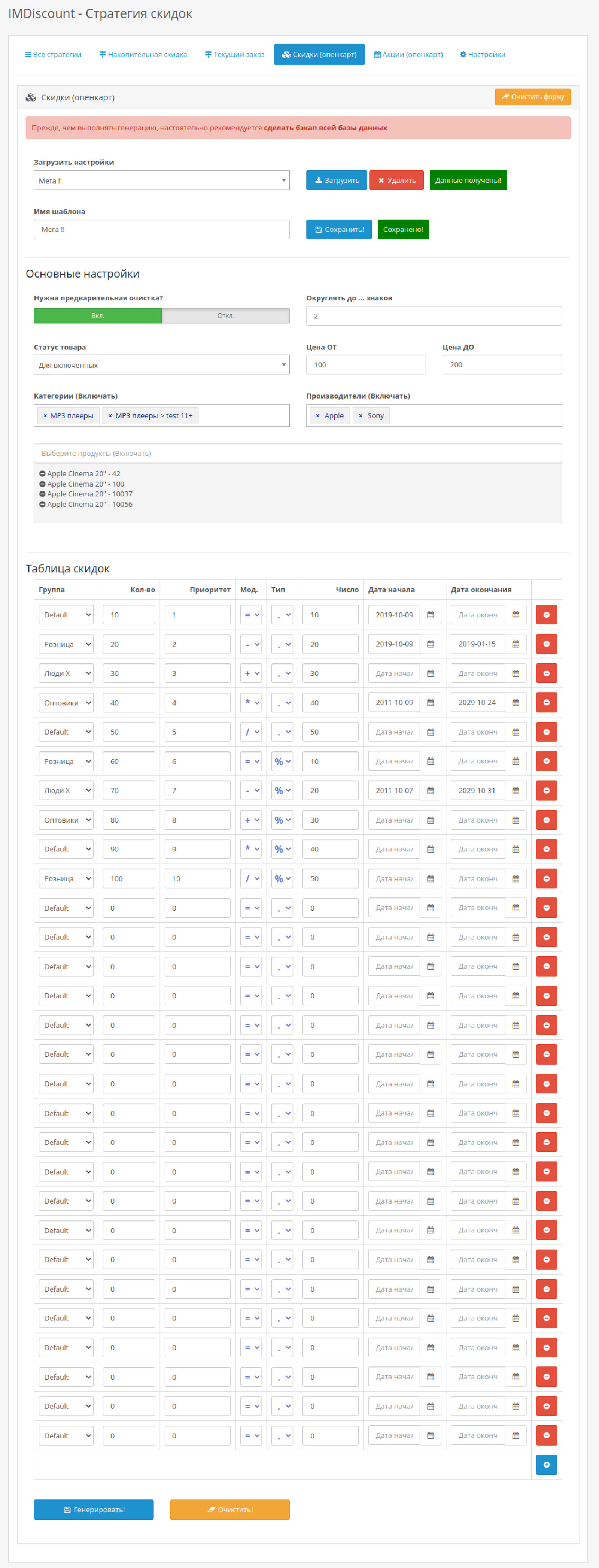
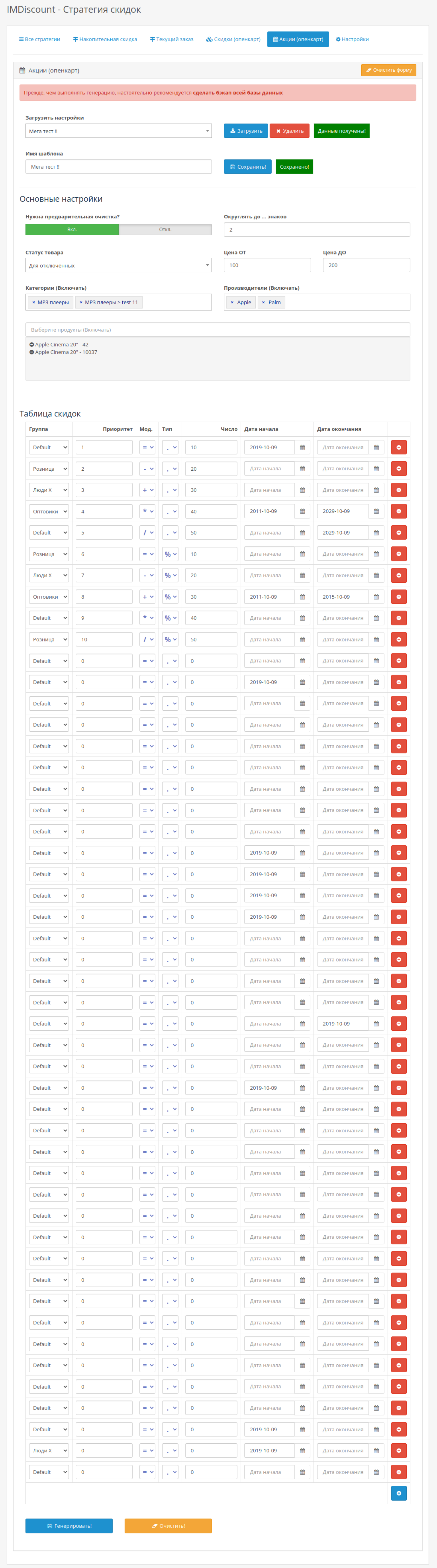
The module supports the ability to mass generate standard discounts and promotions for OpenCart - these are the tabs "Discounts (opencart)" and "Promotions (opencart)".
Please note that mass generation is not a strategy, so they are created directly in the tab and are not displayed in the general list (as in the IMDiscount display modules, etc.).
Filtering is carried out according to the following rule. The product is suitable in the following cases:
- If the product is in the specified categories AND the specified manufacturers AND in the price range AND with the corresponding status
- OR - If the product is listed separately
Please note that if generation is required ONLY for individual products, then you must make sure that the filters for the first item are empty (no prices are set in the filters, no manufacturers and categories are specified, and no status is specified).
For prices. If the value of the cost filter is equal to or less than zero, then it is considered that there are no restrictions for this price filter. For example, the cost FROM equal to 10 and the cost TO equal to 0 means that the cost of the product must be greater than or equal to 10. Note that prices are set in the base currency.
IMPORTANT! Please note that if all filters are empty, then generation and cleaning will be applied to all products (in essence, no filters = no product check)!
In other words, if you have not specified filters, then when clearing by button (or as part of generation) standard discounts or promotions for all products (depending on what mass generation is used for) will be deleted! Similarly, when generating discounts or promotions from the table (depending on what mass generation is used for) will be added for all products.
Mass generation of standard discounts and promotions - how prices are calculated for types and modifiers
First stage
There are two types of number representation: fixed number (displayed as ".") and percentage (displayed as "%").Based on this data, [the adjustment value] is formed. In the case of a fixed number, this is just a number, and in the case of a percentage, this is the price multiplied by the percentage and divided by 100.
For example, the number 50 for "." it will be 50. And in case of "%" it will be [price] * 50 / 100.
Second stage
There are 5 arithmetic modifiers: equal ("="), subtract ("-"), add ("+"), multiply ("*"), divide ("/"). It's like arithmetic.Modifier "=". Formula [next_price] = [value to adjust]
Modifier "-". Formula [next_price] = [price] - [value to adjust]
Modifier "+". Formula [next_price] = [price] + [value to adjust]
Modifier "*". Formula [next_price] = [price] * [value to adjust]
Modifier "/". Formula [next_price] = [price] / [value to adjust]
IMPORTANT! Fill in types and modifiers carefully
The point is in the example. Let's say multiply by 50%, this means that [next_price] = [price] * [adjustment value] = [price] * ( [price] * 50 / 100 ). In other words, half of the price squared!This also applies to negative prices. The standard mechanism of OpenCart considers this quite correct in many versions (at least in 2.x, 3.0). For understanding: you can set both the price of the product and discounts with promotions negative, and they will be used in the calculation, including the basket and checkout.
Therefore, the module does not perform additional checks for prices, in terms of negative values. You never know, as a client, whether you use this feature. Therefore, be careful and attentive!
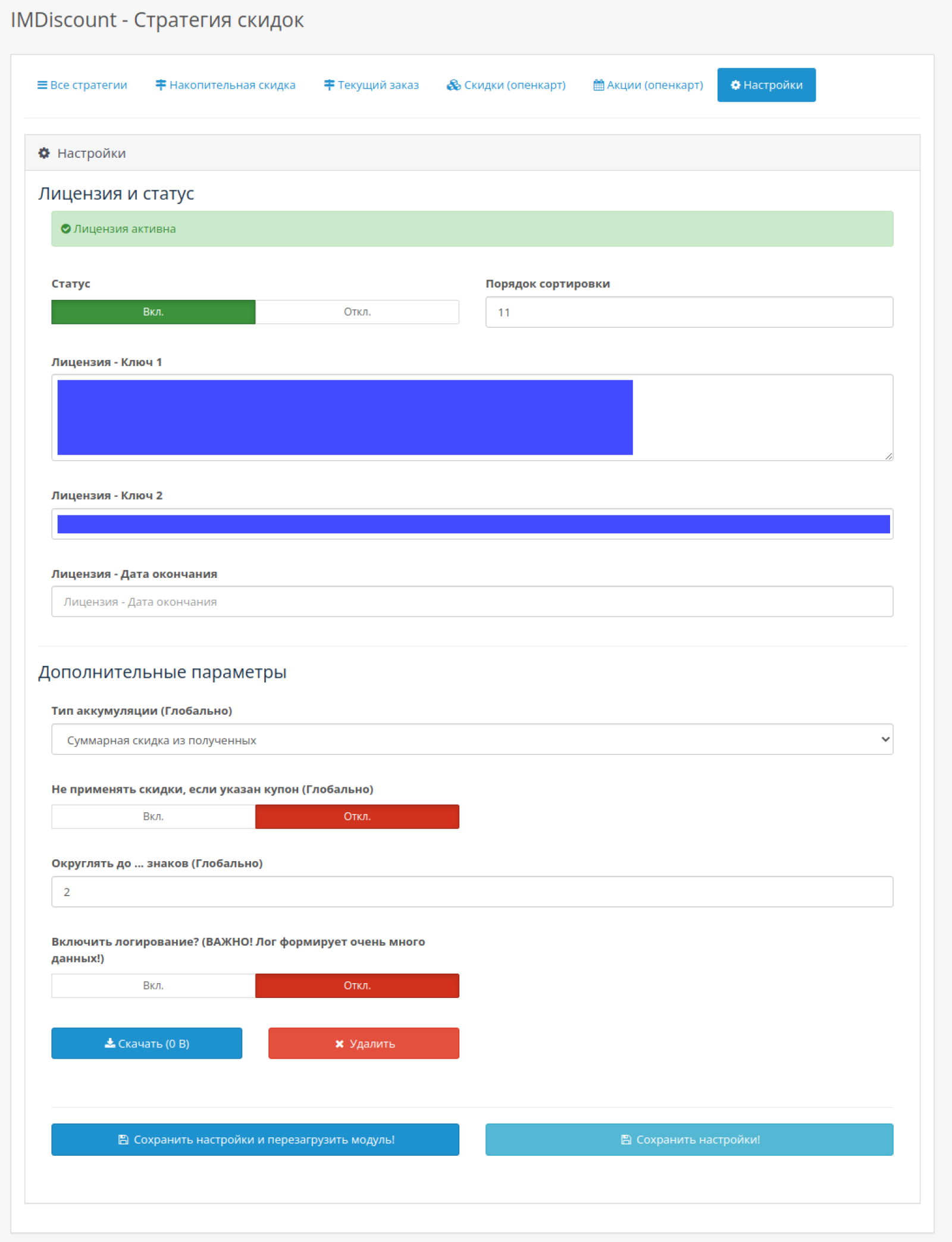
Logging
Logging is enabled in the "Settings" tab. The log file is located in the "storage/logs" directory (DIR_LOGS).
Some important points:
- IMPORTANT!!! The log generates quite a lot of data (one client can easily generate 1MB or more per minute). Therefore, you should not keep it enabled all the time. It is better to approach the log as follows: enable the log, perform the necessary actions, and immediately disable the log.
- Please note that during the log generation, a lot of "sensitive" information is saved in the file. Therefore, after you download the log, the file inside the directory should be deleted.
Please note that the log contains a lot of technical information and is intended for complex situations in which you cannot find the error in the settings yourself.
However, even regular users can use it. In the log file, you need to look for the phrase "After calculateDiscounts". Just above it, the user and group IDs are displayed, as well as the full name. Just below it, summary information on calculated discounts of current strategies for the current basket is displayed (before applying the global discount calculation setting).
Do not apply discounts if there is a coupon
In the module settings, you can disable the application of IMDiscount discounts (strategies) for the case when a coupon is specified. However, for this to happen, the coupon module must be applied BEFORE the IMDiscount module is applied. In other words, the sort order of the IMDiscount module must be greater than the sort order of the coupon module.
The setting applies globally, that is, to all discounts at once.
Features and limitations
- Cumulative discounts apply only to registered users. Visibility can be specified for the current order.
- The calculation of the sum of previous orders in the cumulative strategy is carried out depending on the settings: from the final sum (total), the subtotal sum (sub_total) or excluding delivery (shipping).
- If order statuses are not specified, all orders are summed up.
- The filter by groups and clients is carried out according to the OR rule. That is, either in the list of groups or in the list of users.
- (not relevant since version 1.4.0, since it was transferred in accordance with the standard opencart scheme) For the Russian language, translations are located in system/IMDiscount/Lang
- By default, the IMDiscount module discount amount (resulting) is rounded to 2 digits (set in the "Settings" tab). For negative values, the integer part of the number is rounded. For example, with a value of (-2), the number (127) will be (100), and with a value of (-1), the number (189) will be (190). Note that when rounding to (-3), the number (129) will be (0) (since 1 is less than 5).
- The principle of rounding numbers during mass generation of standard discounts and promotions is similar to the previous point.
- Purchased gift certificates are not full-fledged products (within OpenCart), so a discount on them is only possible if it is calculated from the "Amount before applying IMDiscount", which includes the amount of purchased certificates. For example, in the "current order" strategy, the discount for "Percentage of products without discount" (or all products) will be calculated only for products, but not certificates.
- When calculating the cumulative discount, purchased gift certificates are taken into account in all three options: the final amount is the order amount (total), the amount of goods / subtotal are goods with purchased certificates (sub_total), without delivery - this is the order amount (total) minus the delivery price (shipping). In all options, these amounts include the cost of certificates.
- Please note that if for some reason the delivery amount is indicated with a code different from “shipping”, then such delivery is not taken into account in cumulative discounts.
- By default, lists with ajax loading of clients display 10 clients, and the delay time between requests is 500 ms.
- Please note that all prices are set and taken into account in the base currency.
- It is required that mbstring.func_overload 0 is set in the site settings. If you do not know how to do this, then check with your hosting. In most cases, the default value is 0 (you, as a client, do not need to do anything), but some hostings set the value to 2. This is relevant in cases where you have problems with keys and module activation.
- Requires jQuery and bootstrap.
Installation and next versions
- Make a backup copy of the site - a standard approach (useful before any actions with the site).
- If this is the next version, then first of all disable the previous version of the IMDiscount module in "Consider in order".
- Unzip the archive. Copy the directories "admin", "catalog", "system" to the root of the site. Don't worry, no files will be replaced, except when you install the next version and when you already have my modules (they have common files that do not change).
- Open the admin panel and activate the IMDiscount discount module in "Consider in orders". If this is the next version, then disable and then enable the module.
- Open the admin panel and activate the module for displaying IMDiscount discounts in “Modules / Extensions” (there are different names, depending on the translation).
- If you are using the UniShop2 template, then install the modifier "imdiscount-unishop2.ocmod.zip"
- Update modifiers and clear twig cache.
- Open the IMDiscount module in the admin panel in "Consider in orders" (edit) and to activate discounts in the "Settings" tab, specify the status "Enabled", as well as the order of the order (similar to other accounting modules in the order, such as deliveries, payments, etc.). If this is not done, then discounts may not be applied.
- Install and configure display modules as you need. You may need to clear the twig cache again after this.
IMPORTANT! If you do not specify the correct sorting order in the IMDiscount module, the calculations may be incorrect! At a minimum, the discount calculation should occur after calculating the sum of goods (sub_total).
| File Name | Added | Modified |
|---|---|---|
im-discount_oc3x.ocmod.zip Size: 280.38 KB | 28.02.2025 | 28.02.2025 |
AI Assistant
Recently viewed

Featured


OCMOD.NET is a platform with the best collections of modules and templates to expand the functionality of your online store on Opencart and OcStore.
Write to technical support

- OCMOD.NET © Copyright 2017-2026


Leave your review about this product