 English
 Язык
Язык Українська
Your shopping cart is empty!
You may also like

2.x, 3.x

2.x, 3.x

OpenCart Cache Cleaner Module
 Bonus +49 грн. to your account
| Characteristics | |
| OpenCart | 2.0, 2.1, 2.2, 2.3, 3.0 |
| PHP | 7.0 – 8.5 |
| XML modification | Yes |
| Localization | English, Ukrainian, Russian |
| Statistics | 14608 170 |
| Added | 22.05.2018 |
| Updated | 03.06.2026 · 1 months ago |
| Files | cache-cleaner_oc3x.ocmod.zip |
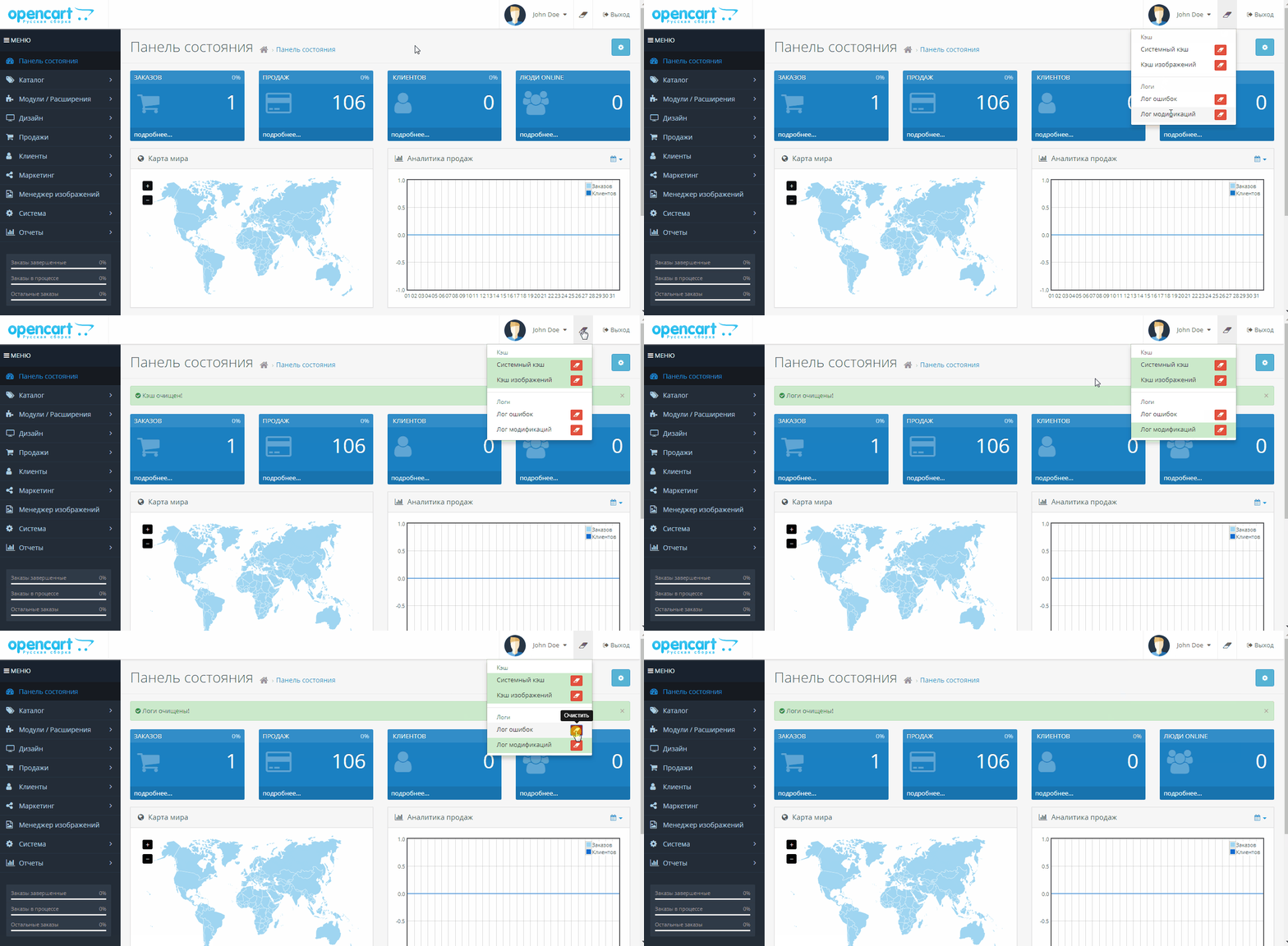
This cache clearance module adds quick-access buttons to the admin panel's top menu for instant cache and log resetting. When you need to clear the OpenCart cache after making edits, there is no longer any need to navigate through multiple sections and search for the right pages.
Why Fast Admin Cache Clearing is Essential
The module eliminates redundant clicks and page reloads during routine store management. The administrator simply clicks the eraser icon in the top header section, selects the required action, and instantly receives a notification confirming successful execution or an error status.
Quickly resetting the OpenCart cache is indispensable after installing extensions, modifying templates, updating product images, or troubleshooting website errors.
Features Added to the Top Menu:
- System Cache — Cleared directly from the drop-down menu with a single click;
- Image Cache — Clearing cached images no longer requires FTP access or manually searching through server folders;
- OpenCart Modifiers Cache — Refreshed instantly after installing, updating, or disabling OCMOD extensions;
- Error Log — Fully cleared via a single button once the log file has been reviewed;
- Modification Log — Can be instantly reset before performing a new check on code changes.
| File Name | Added | Modified |
|---|---|---|
cache-cleaner_oc20-22.ocmod.zip Size: 9.57 KB | 22.05.2018 | 08.09.2023 |
cache-cleaner_oc23.ocmod.zip Size: 14.42 KB | 22.05.2018 | 28.07.2025 |
cache-cleaner_oc3x.ocmod.zip Size: 12.07 KB | 22.05.2018 | 03.06.2026 |
AI Assistant
Recently viewed
2.x, 3.x

Featured


OCMOD.NET is a platform with the best collections of modules and templates to expand the functionality of your online store on Opencart and OcStore.
Write to technical support

- OCMOD.NET © Copyright 2017-2026


Leave your review about this product