 English
 Язык
Язык Українська
Your shopping cart is empty!
You may also like

2.x, 3.x

2.x, 3.x

Toolbar - OpenCart product information
 Get bonus +100 грн. for your review
| Characteristics | |
| OpenCart | 2.0, 2.1, 2.2, 2.3, 3.0 |
| PHP | 7.0 – 8.5 |
| XML modification | Yes |
| Localization | Ukrainian |
| Statistics | 28362 1213 |
| Added | 29.08.2021 |
| Updated | 05.06.2026 · 1 months ago |
| Files | tool-bar_oc3x.ocmod.zip |
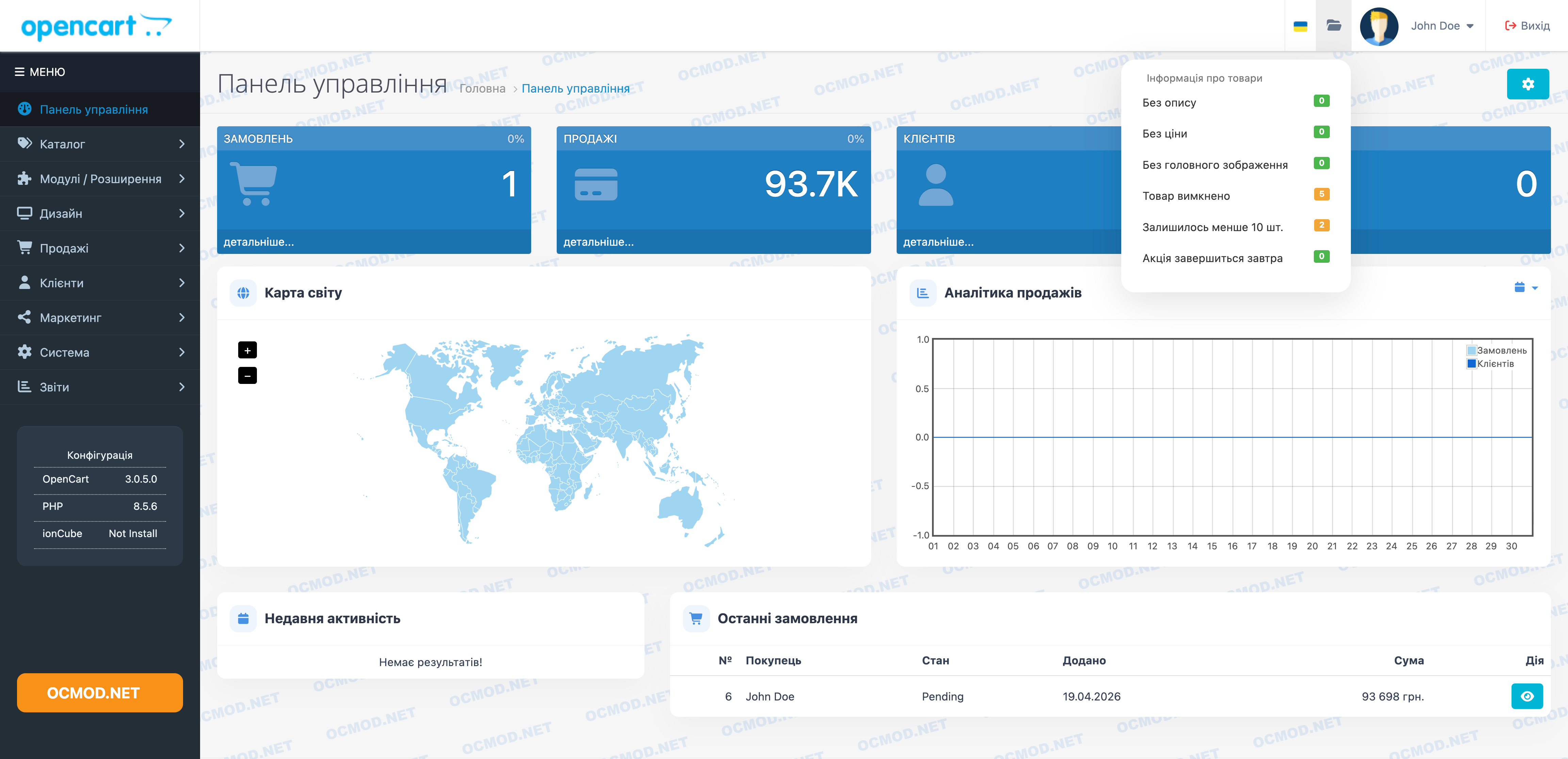
ToolBar adds a compact folder icon to the top panel of the OpenCart admin panel. The drop-down list immediately shows where the catalog has accumulated issues: empty descriptions, zero price, missing main photo, low inventory, or a promotion ending tomorrow.
Why do I need a folder icon in the admin panel?
Without such a summary, managers have to open the product list, set filters, and check each card one by one. ToolBar displays counters directly in the header, next to the administrator's profile, so problem areas are immediately visible upon logging in.
The scenario is simple: an employee logs into the admin panel, opens the menu, and sees the edits needed today. A green checkmark indicates there are no errors, and a yellow one indicates where there are items that need to be reviewed.
What checks are displayed in the top panel?
- Products without description.
- Positions with price 0.
- Cards without main image.
- Disabled products that are not shown to customers in the storefront.
- There are less than 10 pieces left so that the manager has time to check the availability.
- Promotions that end tomorrow.
When the summary quickly finds errors
- After importing a price list, some cards may arrive without photos or descriptions. The counters will immediately show how many such items remain.
- Before launching an ad, it's a good idea to check if there are any products with a zero price or empty cards.
- When working with the remaining stock, the manager sees that the stock for some items has dropped below 10 units.
- Before the sale ends, the list reminds you of discounts that will end tomorrow.
We recommend checking the drop-down menu before making bulk edits to the catalog and after uploading new products to avoid manually searching for errors.
ToolBar doesn't change cards automatically. It displays a short diagnostic dashboard for the administrator, content manager, and the employee who oversees the catalog on a daily basis.
AI Assistant
Recently viewed
2.x, 3.x

Featured


OCMOD.NET is a platform with the best collections of modules and templates to expand the functionality of your online store on Opencart and OcStore.
Write to technical support

- OCMOD.NET © Copyright 2017-2026


Leave your review about this product