 English
 Язык
Язык Українська
Your shopping cart is empty!
You may also like

2.x, 3.x

2.x, 3.x

Quick access to OpenCart admin sections

 Bonus +49 грн. to your account
| Characteristics | |
| OpenCart | 3.0 |
| PHP | 7.0 – 8.5 |
| XML modification | Yes |
| Localization | English, Ukrainian, Russian |
| Statistics | 17875 173 |
| Added | 16.08.2018 |
| Updated | 17.05.2026 · 2 months ago |
| Files | quick-menu_oc3x.ocmod.zip |
When a manager opens orders, products, coupons, or delivery settings 30 times a day, the standard left-hand menu quickly becomes boring. Quick Menu Bar adds a separate panel to the admin header with short links to relevant sections.
Quick links right in the admin header
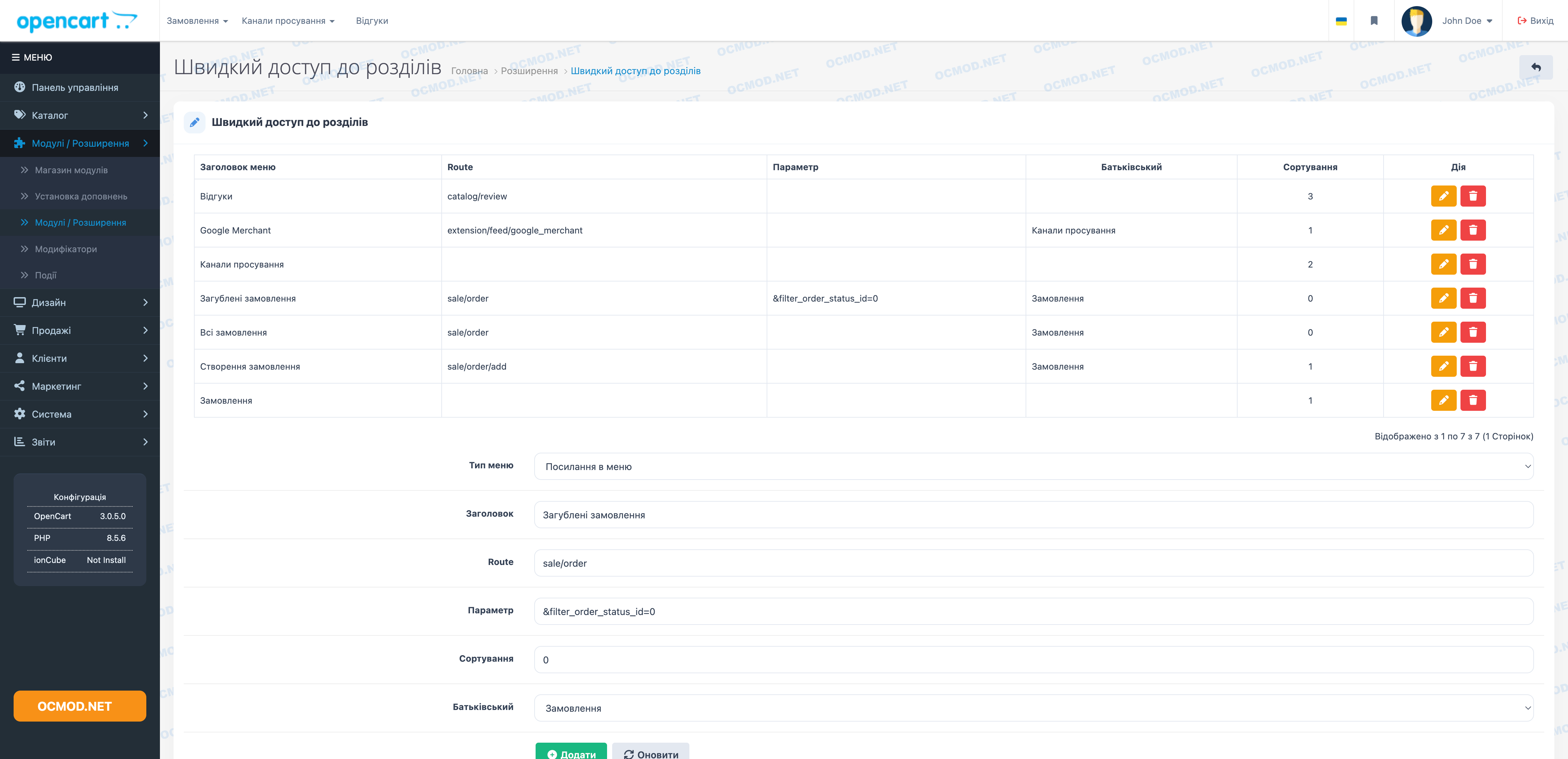
The module displays its menu items on the top panel. The administrator chooses which sections to display there: the orders page, product list, reports, module settings, or any other OpenCart admin screen.
Managers don't need to expand the side menu and search through sections to find the desired item. Frequent actions are accessible in one click, and groups of links can be organized into drop-down menus.
How the Quick Menu Works in Daily Work
- Adding a separate link - for example, directly to the list of orders or product cards.
- Create a drop-down section for multiple related items.
- Sort items numerically so that frequently used links appear first.
- Editing the name of an item without deleting the old entry.
- Removing an unnecessary link from the list; child items are also removed.
- Display only for logged in employees - admin panel guests do not see the panel.
- Working with nested items: a link can be independent or included in a selected section.
- A panel in the header on a wide screen and a button with a bookmark icon for the collapsed mode.
- The list of created items is shown in a table with the name, address, parent and output order.
It's best to limit the menu to sections that are accessed daily. This way, the panel stays short and doesn't become a second left sidebar.
What the administrator configures for each item
- Item type: regular link or drop-down menu title.
- The name that will be visible in the top bar.
- The address of the admin section where the transition should lead.
- An additional parameter for the link if a precise screen or filter is needed.
- The parent item to place inside the dropdown list.
- Sorting order to assemble the menu in a familiar sequence.
The Quick Menu Bar is useful for stores where managers, content editors, and owners work with the admin panel: everyone gets a quick route to their most frequently used sections without searching through the standard menu.
| File Name | Added | Modified |
|---|---|---|
quick-menu_oc3x.ocmod.zip Size: 17 KB | 16.08.2018 | 17.05.2026 |
AI Assistant
Recently viewed

Featured


OCMOD.NET is a platform with the best collections of modules and templates to expand the functionality of your online store on Opencart and OcStore.
Write to technical support

- OCMOD.NET © Copyright 2017-2026


Leave your review about this product