 English
 Язык
Язык Українська
Your shopping cart is empty!
You may also like

2.x, 3.x

2.x, 3.x

Importing products from PROM.UA for OpenCart
 Bonus +49 грн. to your account
| Characteristics | |
| OpenCart | 3.0 |
| PHP | 7.0 – 8.5 |
| XML modification | Yes |
| Localization | English, Ukrainian, Russian |
| Additional | requires LocalCopy |
| Statistics | 1535 40 |
| Added | 18.03.2026 |
| Updated | 18.03.2026 · 4 months ago |
| Files | import-prom-yml_oc3x.ocmod.zip |
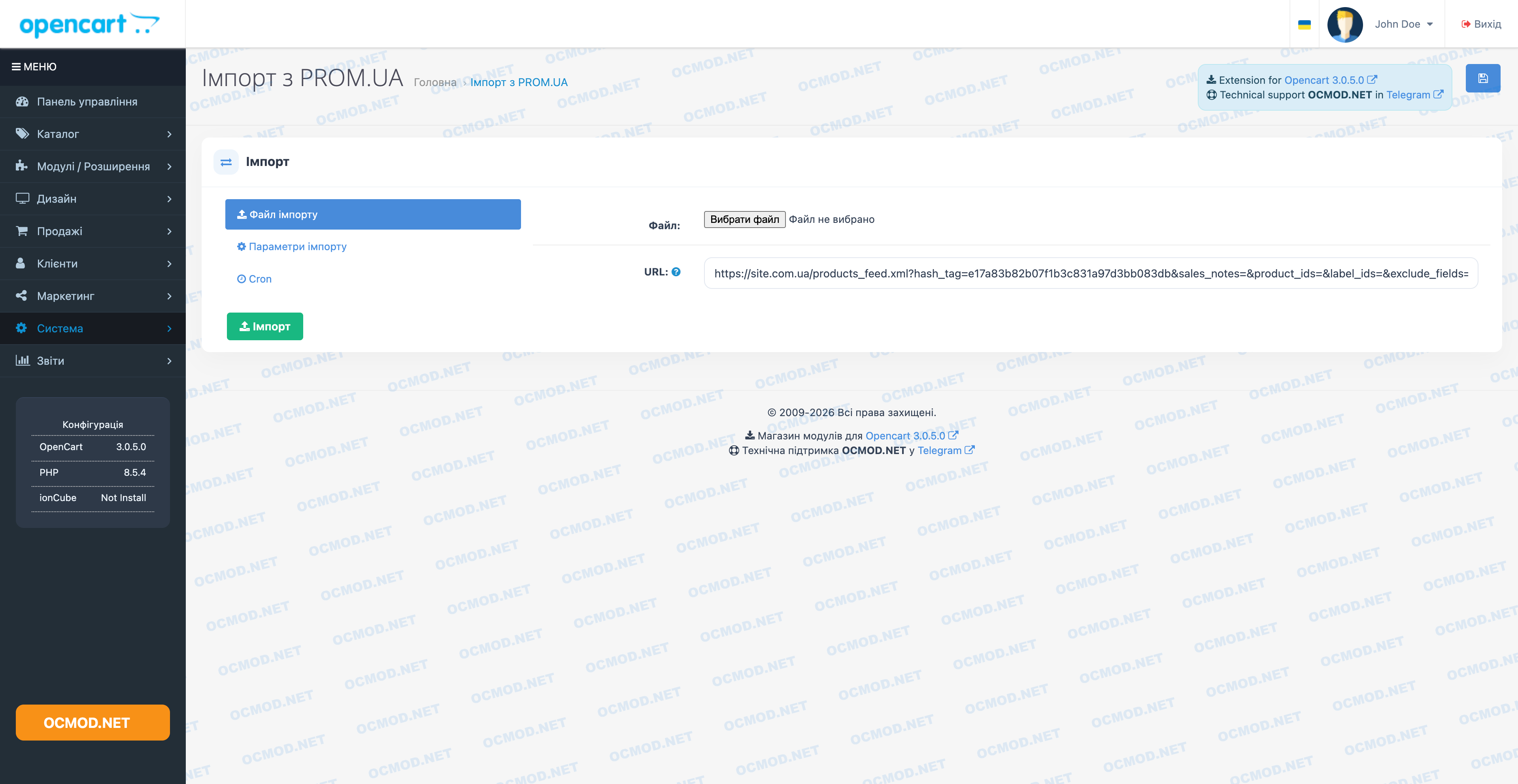
The Product Import from PROM.UA module was created for those who need to quickly populate their OpenCart store with products from the Prom YML feed. Essentially, it's a convenient tool for importing products from prom.ua, supporting manual file uploads or link downloads, as well as automation via cron.
Purpose of the module
The main task is to migrate the catalog to OpenCart and keep it up to date. The module reads YML, creates a category structure, adds products, and captures prices, stock levels, images, manufacturers, and specifications. And if a product already exists in the database, it carefully updates it according to rules you set in the settings.
Key Features
- Import from file (YML upload via admin panel).
- Import by URL - you can specify a link to YML and not keep the file on your computer.
- Synchronization of products by the "Model" field (product code): if it matches, the product will be updated; if not, it will be added.
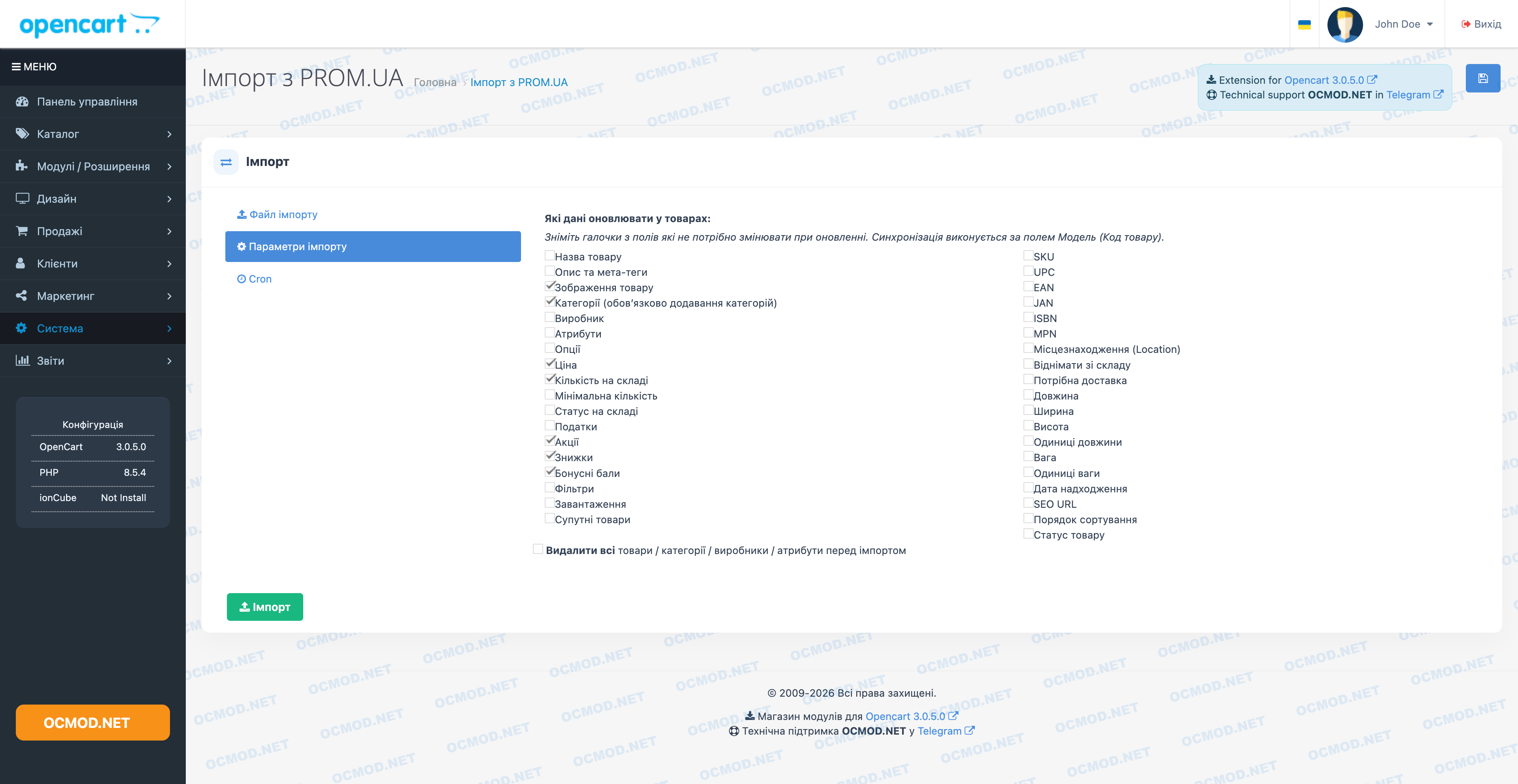
- Flexible field update Specify what exactly can be overwritten during re-import.
- Categories creating and linking products to categories from the feed.
- Manufacturers automatic creation and linking of brands.
- Attributes created as needed and filled with values from product parameters.
- Loading images from a remote host and placing them into folders inside catalog/import_prom.
- SEO URL generating human-readable links (with protection against duplicates between languages).
- Support for multiple languages (including RU/UA, if configured in the store).
Update settings: what you can control
The module includes a list of fields that can be enabled or disabled for updating on subsequent uploads. This is convenient when you manually edit some data in the store and want to retrieve other data from the feed.
Examples of fields that can be updated selectively
- Title, description and meta tags
- Categories
- Manufacturer
- Attributes
- Price, promotions (special), discounts (discount)
- Quantity, availability status
- Images
- SEO URL
- Related, downloads, filters (if used in the store)
Important: Syncing is performed based on the "Model" field. If your feed's models are populated inconsistently, align them in advance to ensure accurate and predictable updates.
Delete All Before Import mode
For a "clean start," a forced database cleanup option is available: the module can delete products, categories, manufacturers, attributes, and attribute groups before loading.
- Suitable for the first launch, tests, and moving to a new directory.
- Useful when you need to completely replace the product range.
Recommendation: Before enabling delete mode, back up your database. This action is irreversible and affects the core catalog tables.
Automatic import on schedule (cron)
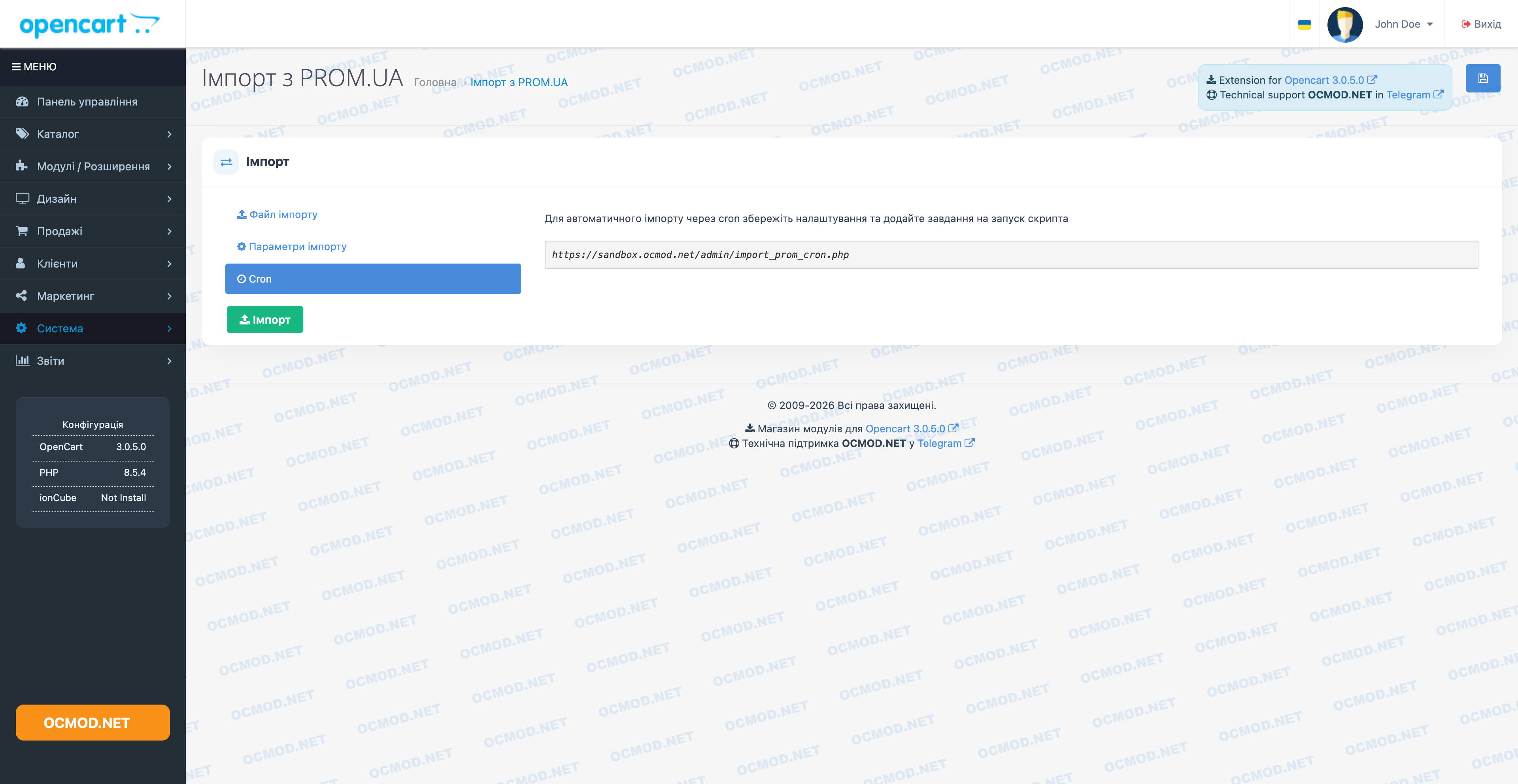
If you want to import products from prom.ua without a manager's intervention, save the settings (especially the feed URL) and add a cron job to run the import script. This is ideal for daily price and inventory updates.
Example of application
- You upload YML on the Prom side (or provide a link to a ready-made feed).
- In the module, you specify the URL and mark the fields that can be updated (for example, price and quantity).
- Set up a cron job, and the store will automatically pull up current data on a regular basis.
Benefits for the store owner
- Save time – bulk add and update your catalog in one run.
- Control - you decide which fields are "sacred" and should not be overwritten.
- Convenient admin panel —import is launched from a clear section in the control panel.
- Practical structure - categories, manufacturers and attributes are created automatically based on feed data.
If you need a stable tool that turns YML into a live OpenCart catalog and helps you keep your data organized, Import Prom is a great solution.
| File Name | Added | Modified |
|---|---|---|
import-prom-yml_oc3x.ocmod.zip Size: 38.04 KB | 18.03.2026 | 18.03.2026 |
AI Assistant
Recently viewed

Featured


OCMOD.NET is a platform with the best collections of modules and templates to expand the functionality of your online store on Opencart and OcStore.
Write to technical support

- OCMOD.NET © Copyright 2017-2026


Leave your review about this product