 English
 Язык
Язык Українська
Your shopping cart is empty!
You may also like

2.x, 3.x

2.x, 3.x

Custom JS & Scripts Manager

 Bonus +49 грн. to your account
| Characteristics | |
| OpenCart | 2.0, 2.1, 2.2, 2.3, 3.0 |
| PHP | 7.0 – 8.5 |
| XML modification | Yes |
| Localization | English, Ukrainian, Russian |
| Statistics | 10794 98 |
| Added | 07.11.2020 |
| Updated | 04.06.2026 · 1 months ago |
| Files | custom-js_oc3x.ocmod.zip |
When you need to add a tracker, such as Google Tag Manager, a chat widget, or a small script to your storefront, you usually have to edit the template files manually if you don't have a dedicated module. Custom JS moves this task directly to the admin panel: simply paste the code into a specific field, and it will automatically appear in the website header.
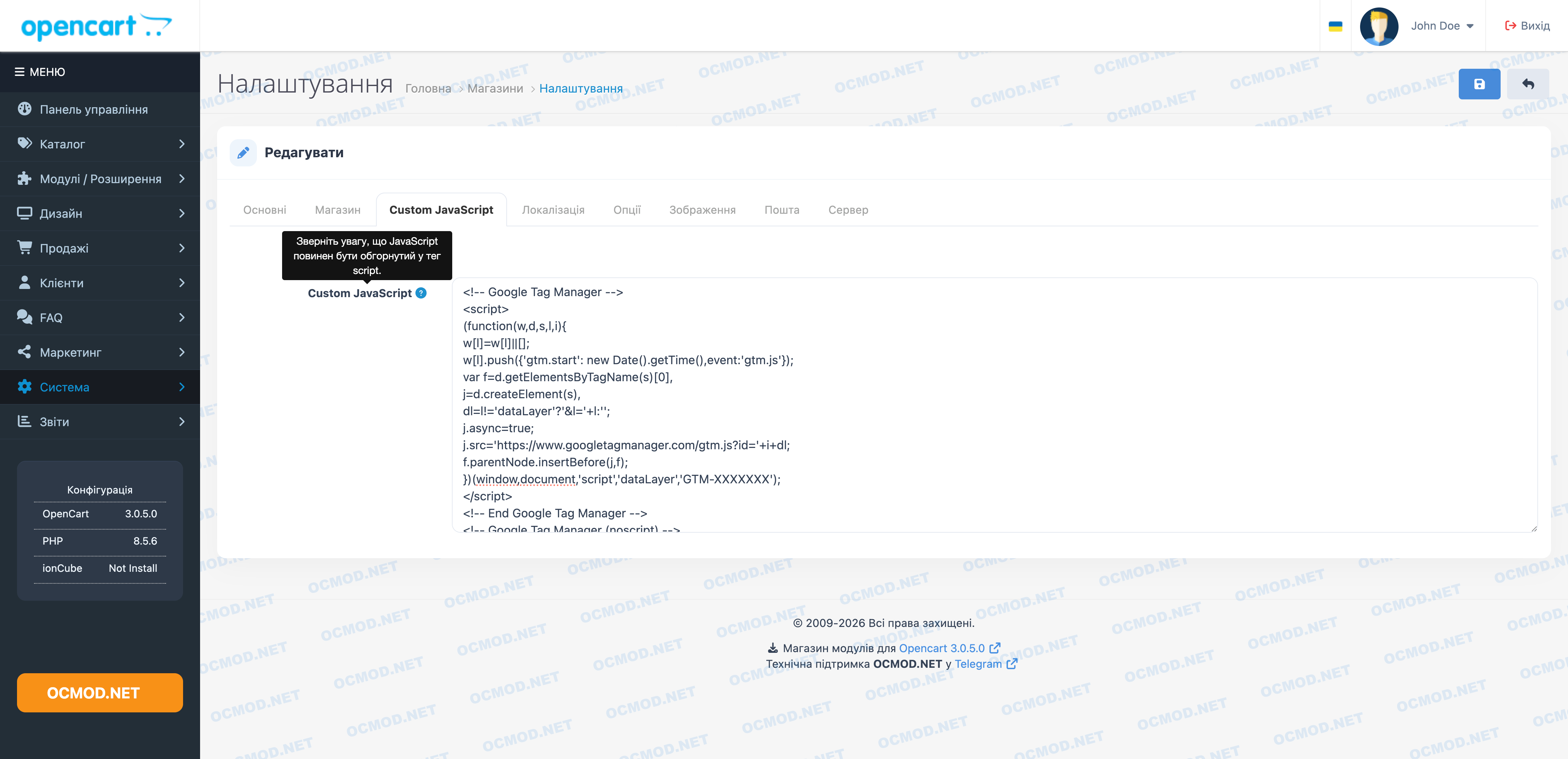
A dedicated tab for scripts in store settings
The module adds a Custom JavaScript tab to the standard OpenCart settings. A store manager or administrator can now insert any code snippet without needing FTP access or editing template files.
- add analytics or tracking pixel code;
- connect an online chat, web form, or third-party widget;
- quickly disable the script injection by simply clearing the field;
- keep all custom code in one place instead of searching for it across multiple templates.
What changes in the admin panel?
- A new tab for custom scripts appears in the store settings.
- JavaScript is rendered on the storefront right before the closing head tag.
- The injected code automatically applies to all pages.
- Once saved, there is no need to manually open theme files or re-apply changes after minor updates.
Typical workflow: a marketer sends a tracking pixel code, the administrator opens the store settings, navigates to the Custom JavaScript tab, pastes the snippet containing the script tag, and saves the changes.
| File Name | Added | Modified |
|---|---|---|
custom-js_oc2x.ocmod.zip Size: 1.32 KB | 14.04.2022 | 17.01.2023 |
custom-js_oc3x.ocmod.zip Size: 1.54 KB | 07.11.2020 | 04.06.2026 |
AI Assistant
Recently viewed
2.x, 3.x

2.3, 3.x

Featured


OCMOD.NET is a platform with the best collections of modules and templates to expand the functionality of your online store on Opencart and OcStore.
Write to technical support

- OCMOD.NET © Copyright 2017-2026


Leave your review about this product