 English
 Язык
Язык Українська
Your shopping cart is empty!
You may also like

2.x, 3.x

2.x, 3.x

OpenCart Product Model Autogeneration

 Bonus +99 грн. to your account
| Characteristics | |
| OpenCart | 2.0, 2.1, 2.2, 2.3, 3.0 |
| PHP | 7.0 – 8.5 |
| XML modification | Yes |
| Localization | English, Ukrainian, Russian |
| Statistics | 58291 259 |
| Files | |
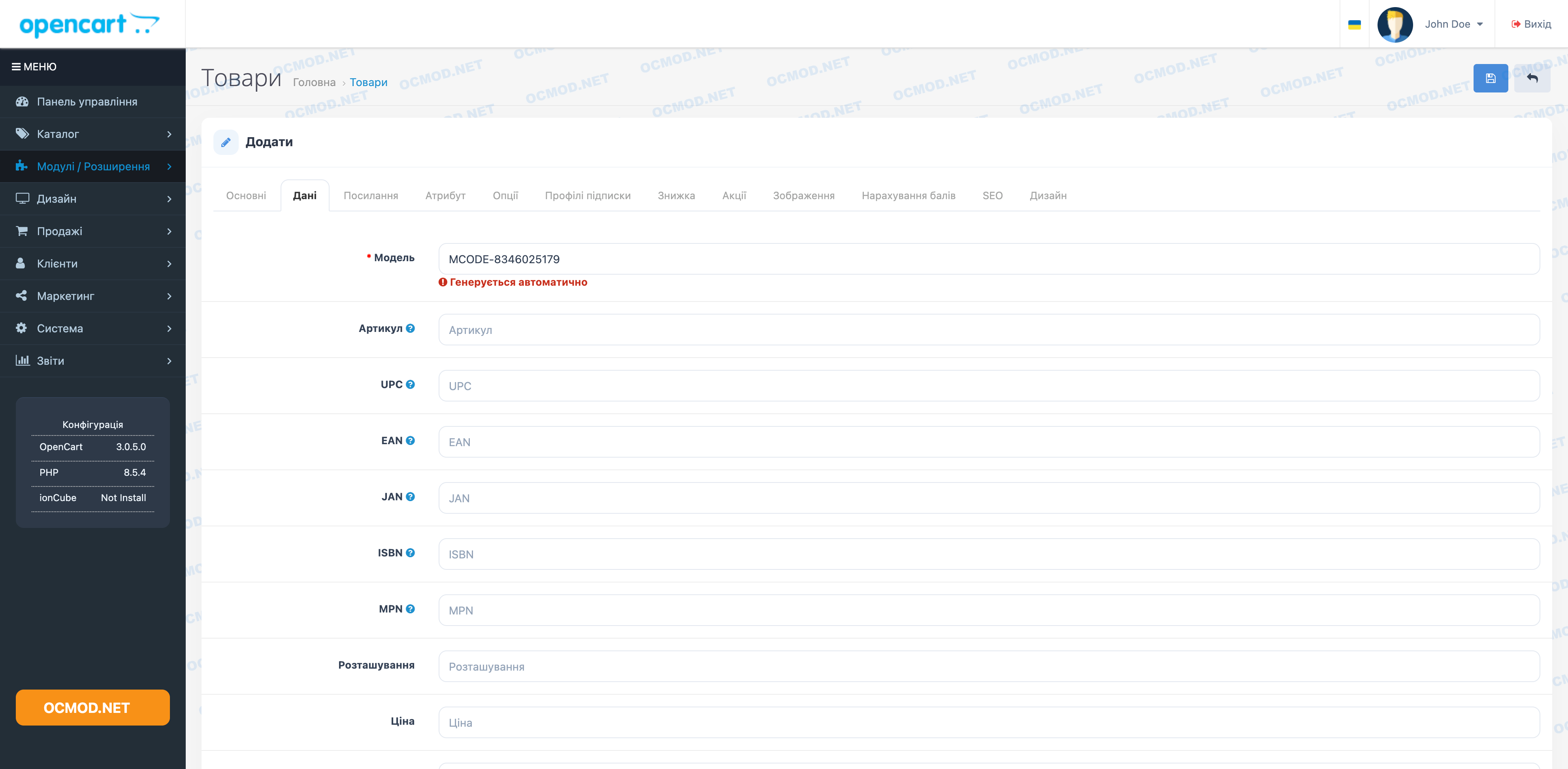
The Product Model Auto-Generator module eliminates the hassle of adding products in the OpenCart admin panel: the "Model" field is automatically populated, eliminating manual entry. This is especially convenient if you frequently create new items, manually import inventory, or simply want a consistent SKU/model format without errors or omissions.
Purpose of the module
When creating a new product, the module generates a unique model number and inserts it into the Model field. Additionally, a clear hint appears next to the field indicating that the value is being generated automatically.
What exactly does the module do?
- Automatically sets the model value when opening the product creation form.
- Generates a model in the form of a prefix and a set of numbers: MCODE-XXXXXXXXXX.
- Shuffles the numbers 0-9 and assembles them into a code to get a “random” number.
- Adds an information label to the “Model” field: “Automatically generated” (for the Russian admin panel) and Auto-Generated Model No (for the English one).
Important: The module automatically populates the model for new products. If you require a strictly sequential number or 100% uniqueness check against the database, that requires separate logic. It uses "random" generation based on digit shuffling.
Application examples
The module is well suited for situations where:
- You add a lot of products manually and want to ensure that the "Model" is never empty.
- The products do not have a “native” article number, and an internal code is needed for accounting.
- You have several managers, and it is important that the model format is the same for everyone.
Recommendations for use
- If your store already has its own SKU system, use the automatic model as an internal code and, if necessary, manually add SKU/UPC/EAN to the product card.
- When integrating (CRM/warehouse), check in advance which field the system considers key—"Model" or "SKU"—so that the code is applied correctly.
- If you need a different prefix instead of MCODE-, you can replace it in the generation code.
| File Name | Added | Modified |
|---|---|---|
auto-model-no-product_oc20-23.ocmod.zip Size: 834 B | 28.04.2017 | 04.01.2018 |
auto-model-no-product_oc3x.ocmod.zip Size: 1.19 KB | 08.02.2018 | 21.03.2026 |
AI Assistant
Recently viewed



Featured


OCMOD.NET is a platform with the best collections of modules and templates to expand the functionality of your online store on Opencart and OcStore.
Write to technical support

- OCMOD.NET © Copyright 2017-2026


Leave your review about this product